Sass 基础
Saas 环境搭建与基本语法
- 下载 Visual Studio Code
demo.scss
.header{
    span{
        color: red;
        &:active{
            color: green;
        }
        &:hover{
            color: blue;
        }
    }
}
demo.sass
.header
span
color: red;
&:active
color: green
&:hover
color: blue- css
.header span {
  color: red;
}
.header span:active {
  color: green;
}
.header span:hover {
  color: blue;
}
变量入门
$small-font:14px+3px;
$text-color:#555;
$default-font:'microsoft yahei';
.title{
    color: lighten($text-color,20%);
    font-size:$small-font;
    font-family: $default-font;
}
.subtitle{
    color: darken($text-color,20%);
    font-size:$small-font;
}
.title {
color: #888888;
font-size: 17px;
font-family: "microsoft yahei";
}
.subtitle {
color: #222222;
font-size: 17px;
}
/*# sourceMappingURL=demo.css.map */嵌套,代码拆分及引入
- 嵌套
div{
    span{
        color: red;
        a{
            color: blue;
        }
    }
}
css
div span {
  color: red;
}
div span a {
  color: blue;
}- 代码拆分
_vir.scss [私有的 scss 文件,用于其他的引用] 不会生成 vir.css
main.scss
@import 'vir';
@import 'header';
@import 'content';
_vir.scss
$color:red;
$content-color:orange;
_header.scss
.header{
    color: $color;
    background-color: $content-color;
}
Mixin 混入的使用
- 公共部分的拆分
- _mixins.scss
@mixin singleline-ellipsis($width) {
    width: $width;
    overflow: hidden;
    white-space:nowrap;
    text-overflow: ellipsis;
}
- main.scss
@import 'mixin';
.text{
    @include singleline-ellipsis(600px);
}
.content-text{
    @include singleline-ellipsis(1000px);
}
媒体查询与 Mixin 的配合使用
- main.scss
@mixin ipad($height) {
    @media screen and (min-width:768px) {
    height:$height;
        @content;
    }
}
.header{
    width: 1000px;
    @include ipad(100px){
        width: 500px;
    }
}
- main.css
.header {
  width: 1000px;
}
@media screen and (min-width: 768px) {
  .header {
      height: 100px;
    width: 500px;
  }
}
Vue 语法初探
初学编写 HelloWorld 和 Counter
//fixed 固定在底部
<div class="footer">
        MIT Licensed | Copyright © 2022-present Damogu
</div>
.footer{
    position fixed
    height 2rem
    bottom 1.2rem
    left 50%
    width 100%
    }
<html lang="en">
<head>
    <meta charset="UTF-8">
    <meta name="viewport" content="width=device-width, initial-scale=1.0">
    <title>Hello World</title>
    <script src="https://unpkg.com/vue@next"></script>
</head>
<body>
    <div id="root"></div>
</body>
<script>
    Vue.createApp({
        data(){
            return {
                content:1
            }
        },
        mounted(){
           setInterval(()=>{
               this.content+=1;
           },1000)
        },
        template:'<div>{{content}}</div>'
    }).mount('#root');
</script>
</html>
编写字符串反转和内容隐藏小功能
- 反转
  Vue.createApp({
        data(){
            return {
                content:'hello world'
            }
        },
        methods:{
            handleBtnClick(){
//vue 里面不会面向 dom 编程,是面向数据编程             this.content=this.content.split('').reverse().join('');
            }
        },
        template:
        `
        <div>
                {{content}}
                <button v-on:click="handleBtnClick">反转</button>
        </div>
        `
}).mount('#root');- 显示隐藏内容
 Vue.createApp({
        data(){
            return {
                show:true,}
        },
        methods:{
            handleBtnClick(){
                this.show=!this.show;
            }
        },
        template:
        `
        <div>
                <span v-if="show">hello world</span>
                <button v-on:click="handleBtnClick">显示/隐藏</button>
        </div>
        `
    }).mount('#root');
编写 TodoList 小功能,了解循环和双向绑定
Vue.createApp({
        data(){
            return {
                inputValue:'',
                list:[]
            }
        },
        methods:{
            handleAddItem(){
                // console.log(this.inputValue);
                this.list.push(this.inputValue);
                this.inputValue='';
            }
        },
        //1.在某个属性上需要绑定内容:v-bind:title="inputValue"
        //2.增加 {{inputValue}},在标签内部
        template:`
        <div>
            <input v-model="inputValue" />
            <button
                v-on:click="handleAddItem"
                v-bind:title="inputValue"
            >
                增加
            </button>
            <ul>
                <li v-for="(item,index) of list">{{item}} {{index}}</li>
            </ul>
        </div>
        `
    }).mount('#root');
组件概念初探,对 TodoList 进行组件代码拆分
 const app= Vue.createApp({
        data(){
            return {
                inputValue:'',
                list:[]
            }
        },
        methods:{
            handleAddItem(){
                // console.log(this.inputValue);
                this.list.push(this.inputValue);
                this.inputValue='';
            }
        },
        //1.在某个属性上需要绑定内容:v-bind:title="inputValue"
        //2.增加 {{inputValue}},在标签内部
        template:`
        <div>
            <input v-model="inputValue" />
            <button
                v-on:click="handleAddItem"
                v-bind:title="inputValue"
            >
                增加
            </button>
            <ul>
                <todo-item v-for="(item,index) of list"
                v-bind:content="item"
                v-bind:index="index"
                />
            </ul>
        </div>
        `
    });
    app.component('todo-item',{
       props:['content','index'],
        template:'<li>{{index}}--{{content}}</li>'
    });
    app.mount('#root');
Vue 基础语法
Vue 中应用和组件的基础概念
//createApp,创建一个 vue 应用,存储到 app 变量中
    //传入的参数表示,这个应用最外层的组件,应该如何展示
    //mvvm 设计模式, m->model 数据, v->view 视图, vm->viewModel 视图数据连接层
    const app= Vue.createApp({
        data(){
            return{
                message:'hello world'
            }
        },
        template:"<div>{{message}}</div>"
    });
    //这应用只作用于 id 等于 root 的 div 元素上去
    //vm 代表的就是 vue 应用的根组件
    const vm= app.mount('#root');
    //在 F12 中输入 vm.$data.message[操作数据,改数据]
理解 Vue 中的生命周期函数
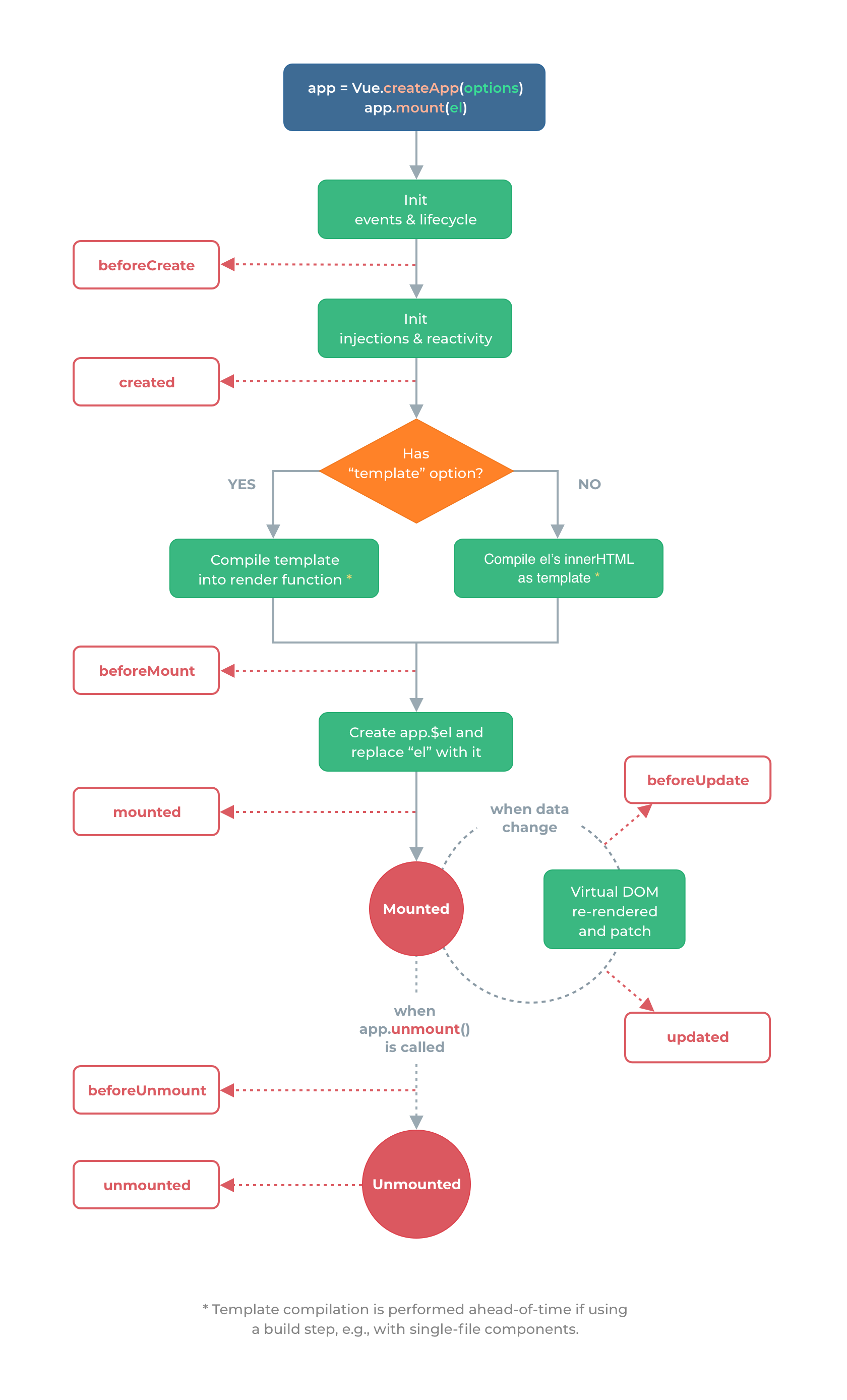
<body>
    <div id="root">
        <!-- 如果没有最下方的 template,则↓ -->
        <div>{{message}}</div>
    </div>
</body>
<script>
    //生命周期函数:在某一时刻会自动执行的函数
    const app= Vue.createApp({
        data(){
            return{
                message:'hello world'
            }
        },
        //在实例生成之前会自动执行的函数
        beforeCreate(){
            console.log('beforeCreate');
        },
        //html 渲染的瞬间
        //在实例生成之后会自动执行的函数
        created(){
            console.log('created');
        },
        //在组件内容被渲染到页面之前自动执行的函数,[挂载之前执行的函数]
        beforeMount(){
            console.log(document.getElementById('root').innerHTML,'beforeMount');
        },
        //在组件内容被渲染到页面之后自动执行的函数,[挂载之后执行的函数]
        mounted(){
            console.log(document.getElementById('root').innerHTML,'mounted');
        },
        //当数据发生变化时会立即自动执行的函数 vm.$data.message='bye' 改变数据时
        beforeUpdate(){
            //<div>hello world</div> beforeUpdate
            console.log(document.getElementById('root').innerHTML,'beforeUpdate');
        },
        //当数据发生变化,页面重新渲染后,会自动执行的函数
        updated(){
            //<div>bye</div> updated
            console.log(document.getElementById('root').innerHTML,'updated');
        },
        //app.unmount()
        //<div>hello world</div> beforeUnmount
        //unmounted
        //当 Vue 应用失效时,自动执行的函数
        beforeUnmount(){
            console.log(document.getElementById('root').innerHTML,'beforeUnmount');
        },
        //当 Vue 应用失效时,且 dom 完全销毁之后,自动执行的函数
        unmounted(){
            console.log(document.getElementById('root').innerHTML,'unmounted');
        },
        // template:"<div>{{message}}</div>"
    });
    const vm= app.mount('#root');
常用模版语法讲解
  const app= Vue.createApp({
        data(){
            return{
                message:"hello world",
                show:false,
                name:'title1',
                event:'mouseenter'//动态参数
            }
            //2. return{
            //     disable:false //可输入
            // }
        },
        //6. v-on:click="handleClick"
        methods:{
            // 一定要写在 methods 上
                handleClick(){
                  alert('click')
                }
            },
        //1. v-html="message" 加粗 <strong>hello world</strong>
        //如果你的属性值想去显示数据变量内容的话,要用 v-bind:title="message"
        //2. 控制是否输入内容的状态
        // template:`<input v-bind:disable="disable"/>`
        //3. {{ JS 表达式 }}
        //4. v-once:第一次展现 hello world,后面一直就展现 hello world,不会管 message 变化
        //降低一些无用的渲染,提高渲染的性能
        //5. v-if="show" 显示,隐藏<div ←>
        //7. v-on: 简写 @,  v-bind: 简写 :
        //8. 动态属性:[name]="message"
        template:
            `<div
            @[event]="handleClick"
            :[name]="message"
            >
                {{message}}
            </div>`
        //9. `<form action="https://www.baidu.com" @click.prevent="handleClick" >
        //     <button type="submit">提交</button>
        // </form>
        // `
    });
    const vm= app.mount('#root');
数据,方法,计算属性和侦听器
  //data: vm.$data.message=123;
    //1. computed 和 methods 都能实现的一个功能,建议使用 computed,因为有缓存
    //2. computed 和 watcher 都能实现的功能,建议使用 computed 因为更加简洁
    const app= Vue.createApp({
        data(){
            return{
                message:"hello world",
                count:4,
                price:5,
                newTotal:10,
            }
        },
        watch:{
            //price 发生变化时,函数会执行
            price(current,prev){
                this.newTotal=current*this.count;
            }
        },
        computed:{
            //计算属性内部带有缓存机制,作页面渲染的时候会更高效
            //当计算属性依赖的内容发生变更时,才会重新执行计算
            total(){
                return Date.now()+this.count;
                // return this.count*this.price;
            }
        },
        methods:{
            // formatString(string){
            //     return string.toUpperCase();
            // },
            //↓↓ `<div>{{formatString(message)}}</div>`
            //只要页面重新渲染,才会重新计算
            getTotal(){
                return Date.now();
                // return this.count*this.price;
            }
        },
        template:
            `<div>{{message}}{{total}}</div>`
    });
    const vm= app.mount('#root');
样式绑定语法
 <style>
        .red{
            color: red;
        }
.green{
            color: green;
        }
    </style>
<script>
     const app= Vue.createApp({
         data(){
             return{
                 //vm.$data.classString='green'
                 classString:'red',
                 classObject:{red:true,green:false},
                 classArray:['red','green',{brown:false}],
                 styleString:'color:yellow;background:orange',
                 styleObject:{
                    color:'orange',
                    background:'yellow'
                 }
             }
         },
         //  <demo class="green"/>
        template:
            `<div :style="styleObject">
             hello
            </div>`
    });
    app.component('demo',{
        template: `
        <div :class="$attrs.class">one</div>
        <div >two</div>
        `
    })
    const vm= app.mount('#root');
</script>
条件渲染
  const app= Vue.createApp({
         data(){
             return{
               show:false,
               conditionOne:false,
               conditionTwo:true,
             }
         },
         //v-show="show" : 频繁改变 dom 的展示与否
        template:`
        <div v-if="show">hello</div>
        <div v-if="conditionOne">if</div>
        <div v-else-if="conditionTwo">elseif</div>
        <div v-else>else</div>
        <div v-show="show">bye</div>
            `
    });
    const vm= app.mount('#root');
列表循环渲染
 <script src="https://unpkg.com/vue@next"></script>
  <body>
    <div id="root"></div>
  </body>
<script>
 const app = Vue.createApp({
      data() {
        return {
          listArray: ["dell", "lee", "teacher"],
          listObject: {
            firstName: "dell",
            lastName: "lee",
            job: "teacher",
          },
        };
      },
      methods: {
        handleAddBtnClick() {
          //1.使用数组的变更函数 push ,pop ,shift,unshift,splice,sort,reverse
          // this.listArray.push('hello');增加新的一个
          // this.listArray.pop(); 从下开始删除
          // this.listArray.shift();//从开头开始删除
          // this.listArray.unshift('hello');//从开头开始新增
          // this.listArray.reverse(); //取反
          //2.直接替换数组
          // this.listArray=['bye','world']
          // this.listArray=['bye'].concat(['world'])//bye -- 0 world -- 1
          // this.listArray=['bye','world'].filter(item=>item==='bye')//bye -- 0
          //3.直接更新数组的内容
          // this.listArray[1]='hello'
          //直接添加对象的内容,也可以自动的展示出来
          // this.listObject.age=100;
          // this.listObject.sex='max'
        },
      },
      //循环优先级比 if 高 v-if="key!=='lastName'"不展示 lastname
      // 用<template></template>避免外部多一层 div
      /*<div>
        <div>
          teacher -- job
        </div>
      </div>*/
      template: `
        <div>
            <template
            v-for="(value,key,index) in listObject"
            :key="index"
            >
              <div v-if="key!=='lastName'">
                {{value}} -- {{key}}</div>
              </div>
            </template>
            <div v-for="item in 10">{{item}}</div>
            <button @click="handleAddBtnClick">新增</button>
        </div>
        `,
    });
    //dell -- firstName -- 0
    //lee -- lastName -- 1
    //teacher -- job -- 2
    const vm = app.mount("#root");
</script>
事件绑定
- 事件修饰符:@click. stop,prevent(阻止默认行为),capture,self,once
    const app = Vue.createApp({
      data() {
        return {
          counter: 0,
        };
      },
      methods: {
        //获取到 event,要额外传递参数,又要获取原生事件对象,使用$evevt
        handleBtnClick(num,event) {
          this.counter+=1
        },
        handleDivClick(){
          alert('div')
        }
      },
      //1.如果绑定一个事件,执行多个函数的时候,逗号隔开,后面必须加()
      //2.@click.stop 当点击 button 时,事件是冒泡的,button 的点击事件会冒泡到上一层的 div 标签上,所以上层的 div 也会感应到点击,停止冒泡就@click.stop
      //3.@click.self 点子元素的时候,不要触发自己(div)的 click 事件
      //4.@scroll.passive 提升滚动的性能
      template: `
        <div>
          <div @click.self="handleDivClick">
            {{counter}}
            <button @click.stop="handleBtnClick">button</button>
          </div>
        </div>
        `
    });
const vm = app.mount("#root");- 按键修饰符 enter, tab, delete, esc, up, down, left, right
const app = Vue.createApp({
      methods: {
        handleKeyDown(){
         console.log('keydown');
        }
      },
      template: `
        <div>
        <input @keydown.delete= "handleKeyDown"/>
        </div>
        `
});- 鼠标修饰符: @click. left, right, middle
- 精确修饰符: @click.ctrl.exact
表单中双向绑定指令的使用(1)
 const app = Vue.createApp({
      data() {
        return {
          message:''
        };
      },
      methods: {},
      // 1.<input v-model="message"/> , 2.textarea 类似
      // 3.message:false : <input type="checkbox" v-model="message"/>
      //4. message:[] : jack<input type="checkbox" v-model="message" value="jack"/>
      template: `
        <div>
          {{message}}
          jack<input type="radio" v-model="message" value="jack"/>
          lee<input type="radio" v-model="message" value="lee"/>
        </div>`,
    });
表单中双向绑定指令的使用(2)
 const app = Vue.createApp({
      data() {
        return {
          message: "",
          options: [
            {
              text: "A",
              value: {value: "A"},
            },
            {
              text: "B",
              value: {value: "B"},
            },
            {
              text: "C",
              value: {value: "C"},
            },
          ],
        };
      },
      //单选: <option disabled value=''>请选择内容</option>
      template: `
      <div>
          {{message}}
          <select v-model="message" multiple>
            <option v-for="item in options" :value="item.value">{{item.text}}</option>
          </select>
        </div>`,
    });
表单中双向绑定指令的使用(3)
- 修饰符 lazy,number,trim
  const app = Vue.createApp({
      data() {
        return {
          //问: 如果是 true hello,没有选中 ??
          //<input type="checkbox" v-model="message" true-value="hello" false-value="world"/>
          message: "123"
        };
      },
      //v-model.lazy 触发 blur 事件的时候,才同步数据的变化:节约触发的时间成本,性能更高
      // {{typeof message}}: string <input v-model.number="message" type="number">输入数字之后,string 变成 number
      template: `
      <div>
          {{message}}
          <input v-model.trim="message"/>
      </div>`,
    });
探索组件的理念
组件的定义及复用性,局部组件和全局组件
 //组件的定义
    //组件具备复用性
    //全局组件,只要定义了,处处可以使用,性能不高,但是使用起来简单. 名字建议,小写字母单词,中间用横线间隔
    //局部组件,定义了,要注册之后才能使用,性能比较高,使用起来有些麻烦. 名字建议,大写字母单词,驼峰命名
    //局部组件使用时,要做一个名字和组件间的映射对象,你不写映射,Vue 底层也会自动尝试帮你做映射
     //2. 局部组件
     // components:{counter},
     const Counter={
        data(){
            return{
                count:1
            }
        },
        template:`<div @click="count+=1">{{count}}</div>`
    }
    // 'hello-world':helloWorld,
    const HelloWorld={
        template:`<div>hello world</div>`
    }
    const app = Vue.createApp({
        components:{
            // counter:Counter,
            // 'hello-world':HelloWorld,
            Counter,HelloWorld,
            },
        template:`
        <div>
            <hello-world/>
            <counter/>
        </div>`
    });
    //1. 全局组件
    // app.component('counter-parent',{
    //     template:`<counter/>`
    // })
    // app.component('counter',{
    //     data(){
    //         return{
    //             count:1
    //         }
    //     },
    //     template:`<div @click="count+=1">{{count}}</div>`
    // })
    const vm = app.mount('#root');
组件间传值及传值校验
  const app = Vue.createApp({
        data() {
            return { num:1234}
        },
        //动态属性传参 :content="num"
        template:
            `<div><test :content="num"/></div>`
    });
    //type: String,Boolean[num:true]↑↑↑,Array,Object,Function,Symbol
    //required 必填
    //default 默认值
    app.component('test', {
        props: {
            content:{
                type:Number,
                validator:function(value){
                    return value<1000;
                },
                default:function(){
                    return 456;
                }
            }
        },
        template: `<div>{{content}}</div>`
    })
    const vm = app.mount('#root');
单项数据流的理解
 //2. 属性传的时候,使用 content-abc 这种命名,接的时候,使用 contentAbc 命名
    //3. 报错: Attempting to mutate prop "count". Props are readonly.
    //单项数据流的概念: 子组件可以使用父组件传递过来的数据,但是绝对不能修改传递过来的数据
    const app = Vue.createApp({
        data() {
            return {
                // content: 1234,
                num:1
            }
        },
        //1. v-bind="params" <==> :content="params.content" :a="params.a" :b="params.b" :c="params.c"
        template:
            // `<div><test :content-abc="content"/></div>`
            `<div>
                <counter :count="num"/>
            </div>`
    });
    // app.component('test', {
    //     props: ['contentAbc'],
    //     template: `<div>{{contentAbc}}</div>`
    // })
    app.component('counter', {
        props: ['count'],
        data(){
            return{
                myCount:this.count,
            }
        },
        //点击,每次修改的是自己组件 data 的内容,是允许修改的
        //vue 里面不允许子组件修改父组件的数据,避免组件之间的数据耦合,让代码维护性更好,避免一些潜在的 bug
        template: `<div @click="myCount+=1">{{myCount}}</div>`
    });
    const vm = app.mount('#root');
Non-Props 属性是什么
 //Non-prop 属性
    const app = Vue.createApp({
        //<counter  style="color:red;"/>
        template:
            `<div>
                <counter msg="hello" msg1="hello1"/>
            </div>`
    });
    //`<div msg="hello">Counter</div>`
    app.component('counter', {
        // inheritAttrs:false, //不添加: msg="hello"
        mounted(){
            console.log(this.$attrs.msg);
        },
        template:
        //v-bind:msg="$attrs.msg"  加上某个属性
        //v-bind="$attrs" 所有父组件传递的 Non-prop 属性,都会加到这第二个 div
         `<div v-bind:msg="$attrs.msg">Counter</div>
         <div v-bind="$attrs">Counter</div>`
    });
    const vm = app.mount('#root');
父子组件间如何通过事件进行通信
   //父子组件如果存在双向绑定关系的时候,可以把复杂的代码缩减
    const app = Vue.createApp({
        data(){
            return { count : 1}
        },
        methods:{
            handleAdd(count){
                this.count+=count;
            }
        },
        //监听事件用-,触发事件用驼峰
        //modelValue =>count
        //:modelValue="count" @add="handleAdd" => v-model="count"
        //v-model:app="count"
        template:
            `<counter v-model="count"/>`
    });
    app.component('counter', {
        props:['modelValue'],//app
        // emits:{
        //     add:(count)=>{
        //         if(count>0){
        //             return true;
        //         }
        //         return false;
        //     }
        // },
        //update:modelValue [固定的] => add
        methods:{
            handleClick(){
                //app => modelValue
                this.$emit('update:modelValue',this.modelValue+3);
            }
        },
        template:
         `<div @click="handleClick">{{modelValue}}</div>
      `
    });
    const vm = app.mount('#root');
组件间双向绑定高级内容(选学)
  const app = Vue.createApp({
        data() {
            return {
                count: 'a',
            }
        },
        template:
            `<counter v-model.uppercase="count"/>`
    });
    app.component('counter', {
        props: {
            //modelModifiers  传递过来的修饰符
            'modelValue': String,
            'modelModifiers': {
                default: () => ({})
            }
        },
        methods: {
            handleClick() {
                let newValue=this.modelValue+'b';
                if(this.modelModifiers.uppercase){
                    newValue=newValue.toUpperCase();
                }
                this.$emit('update:modelValue', newValue);
            }
        },
        template:
            `<div @click="handleClick">{{modelValue}}</div>`
    });
    const vm = app.mount('#root');
使用插槽和具名插槽解决组件内容传递问题(1)
  const app = Vue.createApp({
        //slot 中使用的数据,作用域的问题
        //父(子)模板里调用的数据属性,使用的都是父(子)模板里的数据
        data(){
            return { text :'提交'}
        },
        // <div>提交</div>   插槽 slot
        template:
            `
            <myform>
               <div>{{text}}</div>
            </myform>
            <myform>
                <button>{{text}}</button>
            </myform>
            <myform>
            </myform>
            `
    });
    app.component('myform', {
        methods: {
            handleClick(){
                alert(123)
            }
        },
        template:
        // <slot>default volue</slot>  无插槽时,有默认值
            `<div>
                <input/>
                <span @click="handleClick">
                    <slot>default volue</slot>
                </span>
            </div>`
    });
    const vm = app.mount('#root');
(2)
   //具名插槽
    const app = Vue.createApp({
        template:`
            <layout>
            <template v-slot:header>
               <div>header</div>
            </template>
            <template v-slot:footer>
               <div>footer</div>
            </template>
            </layout>
            `
    });
    app.component('layout', {
        template:
            `<div>
                <slot name="header"></slot>
              <div>content</div>
                <slot name="footer"></slot>
            </div>`
    });
    const vm = app.mount('#root');
作用域插槽
    //当子组件的内容要由父组件决定的时候,用这个作用域插槽实现
    const app = Vue.createApp({
        //简写 #header -> v-slot:header
        //对象解构
        template: `
            <list v-slot="{item}">
                <div>{{item}}</div>
            </list >
            `
    });
    app.component('list', {
        data() { return { list: [1, 2, 3] } },
        template:
            `<div>
                <slot v-for="item in list" :item="item"/>
            </div>`
    });
    const vm = app.mount('#root');
动态组件和异步组件
- 动态组件
   //动态组件: 根据数据的变化,结合 component 这个标签,来随时动态切换组件的显示
    const app = Vue.createApp({
        data(){
            return {currentItem:'input-item'}
        },
        methods:{
            handleClick(){
                if(this.currentItem==='input-item'){
                    this.currentItem='common-item';
                }else{
                    this.currentItem='input-item';
                }
            }
        },
        //keep-alive> 保存原先输入内容
        template: `
        <keep-alive>
            <component :is="currentItem"/>
        </keep-alive>
           <button @click="handleClick">切换</button>
            `
    });
    app.component('input-item', {
        template: `<input />`
    });
    app.component('common-item', {
        template: `<div>hello world</div>`
    });
const vm = app.mount('#root');- 异步组件,,同步组件用的多
   //异步组件:
    const app = Vue.createApp({
        template: `
           <div>
            <common-item/>
            <async-common-item/>
           </div>
            `
    });
    app.component('common-item', {
        template: `<div>hello world</div>`
    });
    app.component('async-common-item',Vue.defineAsyncComponent(()=>{
        return new Promise((resolve,reject)=>{
            setTimeout(()=>{
                resolve({
                    template:`<div>this is an async component</div>`
                })
            },4000)
        })
    }))
    const vm = app.mount('#root');
基础语法知识点查缺补漏
    //1. v-once 让某个元素标签只渲染一次
    // ref 获取 Dom 节点 / 组件引用 的一个语法
    // provide / inject 多值传递
    const app = Vue.createApp({
        data(){
            return {count:1}
        },
        provide(){
            return{
                count:this.count,
            }
        },
        // mounted(){
        //     console.log(this.$refs.common.sayHello());
        // },
        // <common-item  ref="common"/>
        //// <div @click="count+=1" v-once>  只渲染一次,1 一直
        template: `
           <div>
              <child :count="count"/>
              <button @click="count+=1">Add</button>
           </div>
            `
    });
    app.component('child', {
        // methods:{
        //     sayHello(){
        //         alert('hello world')
        //     }
        // },
        template: `<child-child :count="count"/>`
    });
    app.component('child-child', {
        inject:['count'],
        template: `<div>{{count}}</div>`
    });
    const vm = app.mount('#root');
Vue 中的动画
使用 Vue 实现基础的 CSS 过渡与动画效果
    <style>
        /* 动画
        @keyframes leftToRight{
            0%{
                transform: translateX(-100px);
            }
            50%{
                transform: translateX(-50px);
            }
            0%{
                transform: translateX(0px);
            }
        }
        .animation{
            animation: leftToRight 3s;
        } */
        .transition{
            transition: 3s background-color ease;
        }
        /* .blue{
            background: blue;
        }
        .green{
            background: green;
        } */
    </style>
<script>
    //过渡,动画
    const app = Vue.createApp({
        data(){
            return {
                styleObj:{
                    background:'blue'
                }
                // animate:{
                //     // animation:false
                //     transition:true,
                //     blue:true,
                //     green:false
                // }
            }
        },
        methods:{
            handleClick(){
                // this.animate.blue=!this.animate.blue
                // this.animate.green=!this.animate.green
                if(this.styleObj.background==='blue'){
                    this.styleObj.background='green';
                }else{
                    this.styleObj.background='blue';
                }
            }
        },
        template: `
           <div>
              <div class="transition" :style="styleObj">hello world</div>
              <button @click="handleClick">切换</button>
           </div>
            `
    });
    const vm = app.mount('#root');
使用 transition 标签实现单元素组件的过渡和动画效果
- (1) 封装
   <style>
        @keyframes shake{
            0%{
                transform: translateX(-100px);
            }
            50%{
                transform: translateX(-50px);
            }
            100%{
                transform: translateX(50px);
            }
        }
        .v-leave-active{
            animation:shake 3s;
        }
        .v-enter-active{
            animation:shake 3s;
        }
    </style>
<script>
    //单元素/单组件的入场出场动画
    const app = Vue.createApp({
        data() {
            return {
                show: false,
            }
        },
        methods: {
            handleClick() {
                this.show = !this.show;
            }
        },
        //<transition name="hello">  hello -> v 上 style
        template: `
           <div>
           <transition>
              <div v-if="show">hello world</div>
              </transition>
              <button @click="handleClick">切换</button>
           </div>
            `
    });
const vm = app.mount('#root');- (2)
    const app = Vue.createApp({
        data() {
            return {
                show: false,
            }
        },
        methods: {
            handleClick() {
                this.show = !this.show;
            },
            handleBeforeEnter(el){
                el.style.color="red";
            },
            handleEnterActive(el,done){
                const animation= setInterval(()=>{
                    const color=el.style.color;
                    if(color==='red'){
                        el.style.color="green";
                    }else{
                        el.style.color="red";
                    }
                },1000)
                setTimeout(()=>{
                    clearInterval(animation);
                    done();
                },3000);
                // setTimeout()
            },
            handleEnterEnd(){
                alert(123);
            }
        },
        //<transition type="animation"> 控制动画和过渡同步执行的效果
        //:duration="{enter:1000,leave:3000}" 控制时间
        template:
        //el, el done,el,el,el done,el
         `
           <div>
                <transition
                    :css="false"
                    @before-enter="handleBeforeEnter"
                    @enter="handleEnterActive"
                    @after-enter="handleEnterEnd"
                    @before-leave=
                    @leave=
                    @leave-after=
                >
                    <div v-show="show">hello world</div>
                </transition>
                <button @click="handleClick">切换</button>
           </div>
            `
    });
    const vm = app.mount('#root');
组件和元素切换动画的实现
 <style>
        .v-leave-to{
            opacity: 0;
        }
        .v-enter-from{
            opacity: 0;
        }
        .v-enter-active,
        .v-leave-active{
            transition: opacity 1s ease-in;
        }
        .v-enter-to,
        .v-leave-from{
            opacity: 1;
        }
    </style>
<script>
    //多个单元素标签之间的切换
    //多个单组件之间的切换
    const ComponentA={
        template:'<div>hello world</div>'
    }
    const ComponentB={
        template:'<div>bye world</div>'
    }
    const app = Vue.createApp({
        data() {
            return {
                // show: false
                component:'component-a'
                }
        },
        methods: {
            handleClick() {
                // this.show = !this.show;
               if(this.component === 'component-a'){
                 this.component='component-b';
               }else{
                this.component='component-a';
               }
            },
        },
        components:{
            'component-a':ComponentA,
            'component-b':ComponentB,
        },
        template:
        //in-out : 先进来,再慢慢隐藏
        //appear : 第一次进来,,也会有渐变
        //单组件写法 <div v-else="show">bye world</div>
         `
           <div>
                <transition mode="out-in" appear>
                    <component :is="component"/>
                </transition>
                <button @click="handleClick">切换</button>
           </div>
            `
    });
    const vm = app.mount('#root');
列表动画
- 作业: 移除动画,点击数字可以删除的功能
<!DOCTYPE html>
<html lang="en">
  <head>
    <meta charset="UTF-8" />
    <meta name="viewport" content="width=device-width, initial-scale=1.0" />
    <link
      rel="stylesheet"
      href="https://cdnjs.cloudflare.com/ajax/libs/animate.css/4.1.1/animate.min.css"
    />
    <style>
      /* 入场 */
      .v-enter-from {
        opacity: 0;
        transform: translateY(30px);
      }
      .v-enter-active {
        transition: all 0.5s ease-in;
      }
      .v-enter-to {
        opacity: 1;
        transform: translateY(0);
      }
      .v-move {
        transition: all 0.5s ease-in;
      }
      .list-item {
        display: inline-block;
        margin-right: 10px;
      }
    </style>
    <script src="https://unpkg.com/vue@next"></script>
  </head>
  <body>
    <div id="root"></div>
  </body>
  <script>
    //列表动画的实现
    const app = Vue.createApp({
      data() {
        return {
          list: [1, 2, 3],
        };
      },
      methods: {
        handleClick() {
          this.list.unshift(this.list.length + 1);
        },
      },
      template: `
      <div>
        <transition-group>
          <span class="list-item" v-for="item in list" :key="item">{{item}}</span>
        </transition-group>
        <button @click="handleClick">增加</button>
      </div>
    `,
    });
    const vm=app.mount('#root')
  </script>
</html>
状态动画
 //状态动画,svg
    const app = Vue.createApp({
        data() {
            return {
                number: 1,
                animateNumber: 1
            }
        },
        methods: {
            handleClick() {
                this.number = 10;
                if (this.animateNumber < this.number) {
                    const animation = setInterval(() => {
                        this.animateNumber += 1;
                        if (this.animateNumber === 10) {
                            clearInterval(animation);
                        }
                    }, 100);
                }
            },
        },
        template:
            `
         <div>
                <div>{{animateNumber}}</div>
                <button @click="handleClick">增加</button>
           </div>
        `
    });
    const vm = app.mount('#root');
Vue 中的高级语法
Mixin 混入的基础语法(1)
 //组件 data,methods 优先级高于 mixin data,methods 的优先级,
    //生命周期函数,mixin 的先执行,后执行组件里面的
    const myMixin = {
      data() {
        return { number: 2,count:1 };
      },
      created(){
        console.log('mixin created');
      },
      methods:{
        handleClick() {
          console.log("mixin handleClick");
        },
      }
    };

    const app = Vue.createApp({
      data() {
        return {number:1};
      },
      created(){
        console.log('created');
      },
      mixins: [myMixin],
      methods: {
        handleClick() {
          console.log("handleClick");
        },
      },
      template: `
      <div>
        <div>{{number}}</div>
        <child/>
        <button @click="handleClick">增加</button>
      </div>
    `,
    });
const vm = app.mount("#root");
Mixin 混入的基础语法(2)
 //全局 mixin 维护性不高
    const myMixin = {
      number: 1,
    };

    const app = Vue.createApp({
      mixins:[myMixin],
      //自定义属性,组件中的属性优先级高于 mixin 属性的优先级
      number: 2,
      template: `
      <div>
        <div>{{this.$options.number}}</div>
      </div>
    `,
    });
    //修改优先级
    app.config.optionMergeStrategies.number=(mixinVal,appValue)=>{
        return mixinVal||appValue
    }
开发实现 Vue 中的自定义指令(1)
    /*局部指令
    const directives = {
      focus: {
        mounted(el) {
          el.focus();
        },
      },
    };*/
    //自定义指令 directive
    const app = Vue.createApp({
      data() {
        return {
          hello:true
        }
      },
      //局部: directives:directives,
      template: `
        <div>
          <div v-if="hello">
            <input v-focus/>
          </div>
        </div>
    `,
    });

    app.directive("focus", {
      beforeMount(el) {
        console.log("beforeMount");
      },
      mounted(el) {
        console.log("mounted");
        el.focus();
      },
      beforeUpdate(){
        console.log("beforeUpdate");
      },
      updated(){
        console.log('updated');
      },
      //即将销毁
      beforeUnmount(){
        console.log('beforeUnmount');
      },
      //销毁过后
      unmounted(){
        console.log('unmounted');
      }
    });
    const vm = app.mount("#root");
开发实现 Vue 中的自定义指令(2)
 .header{
        position: absolute;
      }
const app = Vue.createApp({
data() {
return {
distance:110
}
},
//v-pos:left="distance" 距离左侧有距离
template: `
<div>
<div v-pos:left="distance" class='header'>
<input/>
</div>
</div>
`,
});
//简写 ↓ mounted,undated : top:300 <div v-pos="top" class='header'>
app.directive('pos',(el,binding)=>{
el.style[binding.arg]=(binding.value+'px')
})
// app.directive("pos", {
// mounted(el,binding){
// el.style.top=(binding.value+'px')
// },
// //当数据发生变化时,组件要重新渲染,这会重新重置一下高度
// undated(el,binding){
// el.style.top=(binding.value+'px')
// }
// });
const vm = app.mount("#root");Teleport 传送门功能
    <style>
      .area {
        position: absolute;
        left: 50%;
        top: 50%;
        transform: translate(-50%, -50%);
        width: 200px;
        height: 300px;
        background: green;
      }
      .mask {
        position: absolute;
        left: 0;
        right: 0;
        top: 0;
        bottom: 0;
        background: #000;
        opacity: 0.5;
        color: #fff;
        font-size: 100px;
      }
    </style>
    <script src="https://unpkg.com/vue@next"></script>
  </head>
  <body>
    <div id="root"></div>
    <div id="hello"></div>

  </body>
  <script>
    const app = Vue.createApp({
      data() {
        return {
          show: false,
          message:'hello'
        };
      },
      methods: {
        handleBtnClick() {
          this.show = !this.show;
        },
      },
      //<teleport to="body"> 传递给 body,蒙层铺满屏幕
      //在蒙层显示文字
      template: `
        <div class="area">
          <button @click="handleBtnClick">按钮</button>
          <teleport to="body">
            <div class="mask" v-show="show">{{message}}</div>
          </teleport>
        </div>
    `,
    });
    const vm = app.mount("#root");
  </script>
更加底层的 render 函数(选学)
    //render function
    //template -> render -> h -> 虚拟 DOM(JS 对象)->真实 DOM ->展示到页面上
    const app = Vue.createApp({
      template: `
      <my-title :level="2">
        hello de
      </my-title>
      `,
    });
    //展示不同大小的标题 hello
    app.component("my-title", {
      props:['level'],
      render(){
        const {h}=Vue;
        //虚拟 dom: 1.可以让 vue 的性能更快 2.让 vue 具备一个跨平台的能力 (weex 开发工具去编写移动端的代码)
        /*
        {
          tagName:'div',
          attributes:{},
          text:'hello',
        }
        */
         return h("h" + this.level, {}, [
          this.$slots.default(),
         //无限嵌套
          h("h4", {}, "dell"),
        ]); //返回虚拟 dom 节点的函数
      }
    });
    const vm = app.mount("#root");
插件的定义和使用
    //plugin 插件,也是把通用性的功能封装起来
    const myPlugin = {
      install(app, options) {
        app.provide("name", "delllee");
        app.directive("focus", {
          mouted(el) {
            el.focus();
          },
        });
        app.mixin({
          mounted() {
            console.log("mixin");
          },
        });
        app.config.globalProperties.$sayHello = "hello world";
      },
    };

    const app = Vue.createApp({
      template: `
        <my-title />
     `,
    });

    app.component("my-title", {
      inject: ["name"],
      mounted() {
        console.log(this.$sayHello);
      },
      template: `<div>{{name}}<input v-focus/></div>`,
    });

    app.use(myPlugin, { name: "dell" });
    const vm = app.mount("#root");
数据校验插件开发实例
 const app = Vue.createApp({
      data() {
        return {
          name: "dell",
          age: 28,
        };
      },
      rules: {
        age: {
          validate: (age) => age > 25,
          message: "too young",
        },
        name: {
          validate: (name) => name.length >= 4,
          message: "name too short",
        },
      },
      template: `
        <div>name:{{name}},age:{{age}}</div>
     `,
    });

    const validatorPlugin = (app, options) => {
      app.mixin({
        created() {
          for (let key in this.$options.rules) {
            const item = this.$options.rules[key];
            this.$watch(key, (value) => {
              const result = item.validate(value);
              if (!result) console.log(item.message);
            });
          }
        },
      });
    };

    app.use(validatorPlugin)
    const vm = app.mount("#root");
Composition API
Setup 函数的使用
 const app = Vue.createApp({
      template: `
        <div @click="handleClick">{{name}}</div>
     `,
      methods: {
        test() {
          console.log(this.$options.setup());
        },
      },
      mounted() {
        this.test();
      },
      //created 实例被完全初始化之前
      setup(props, context) {
        return {
          name: "dell",
          handleClick: () => {
            alert(123);
          },
        };
      },
    });

    const vm = app.mount("#root");
ref,reactive 响应式引用的用法和原理(1)
    //ref, reactive 响应式的引用
    //原理: 通过 proxy 对数据进行封装, 当数据变化时, 触发模板等内容的更新
    //ref 处理基础类型的数据
    //reactive 处理非基础类型的数据
    const app = Vue.createApp({
      template: `
       <div>{{nameObj[0]}}</div>
      `,
      setup(props, context) {
        /*(1)
         const {ref}=Vue;
         proxy,'dell'变成 proxy({value:'dell'})这样的一个响应式引用
         let name = ref('dell');
         setTimeout(() => {
           name.value = "lee";
         }, 2000);
         return { name };*/

        const { reactive } = Vue;
        //proxy,{ name: "dell" }变成 proxy({ name: "dell" })这样的一个响应式引用
        const nameObj = reactive([123]);
        setTimeout(() => {
          nameObj[0] = 456;
        }, 2000);
        return { nameObj };
      },
    });

    const vm = app.mount("#root");
ref,reactive 响应式引用的用法和原理(2)
    const app = Vue.createApp({
      template: `
       <div>{{name}}</div>
      `,
      setup(props, context) {
        const { reactive,readonly,toRefs } = Vue;
        const nameObj = reactive({name:'dell',age:28});
        //copy 出来的不能被响应式修改的
        //const copyNameObj=readonly(nameObj)
        setTimeout(() => {
          nameObj.name='lee'
          // nameObj[0] = 456;
          // copyNameObj[0]=456
        }, 2000);
        /*toRefs
          proxy({name:'dell',age:28}),{
            name:proxy({value:'dell'}),
            age:proxy({value:28})
          }
        */
        const {name}=toRefs(nameObj);
        return { name };
      },
    });

    const vm = app.mount("#root");
toRef 以及 context 参数(1)
  const app = Vue.createApp({
      template: `
       <div>{{age}}</div>
      `,
      setup(props, context) {
        //toRefs 从 data 这响应式对象时找数据的时候,
        //如果找不到的话,不会给 age 默认的响应式引用,而是给 undefined
        const { reactive,toRef } = Vue;
        const data = reactive({name:'dell'});//但是最好给个默认值 age:0
        const age=toRef(data,'age')//取不到数据则置空
        setTimeout(()=>{
          age.value='lee'
        },2000)
        return { age };
      },
    });
toRef 以及 context 参数(2)
   const app = Vue.createApp({
      methods: {
        handleChange() {
          alert("change");
        },
      },
      template: `<child @change='handleChange'>parent</child>`,
    });
    //父组件传递给子组件
    app.component("child", {
      mounted() {
        // console.log(this.$slots);
        this.$emit("change");
      },
      template: '<div @click="handleClick">123324</div>',
      setup(props, context) {
        const { h } = Vue;
        //通过 slots 可以实现传统的 this.$slots 的作用,
        //emit 可以实现传统语法中的 this.$emit 的向上触发的一个功能
        const { attrs, slots, emit } = context;
        // console.log(attrs);//获取 None-Props 属性的内容
        // return ()=>h('div',{},slots.default())
        function handleClick() {
          emit("change");
        }
        return {
          handleClick,
        };
      },
    });
使用 Composition API 开发 TodoList
    //关于 list 操作的内容进行了封装
    const listRelativeEffect = () => {
      const { reactive } = Vue;
      const list = reactive([]);
      const addItemToList = (item) => {
        list.push(item);
      };
      return { list, addItemToList };
    };

    //关于 inputValue 操作的内容进行了封装
    const inputRelativeEffect = () => {
      const { ref } = Vue;
      const inputValue = ref("");
      const handleInputValueChange = (e) => {
        inputValue.value = e.target.value;
      };
      return { inputValue, handleInputValueChange };
    };
    const app = Vue.createApp({
      setup() {
        //流程调度中转
        const { list, addItemToList } = listRelativeEffect();
        const { inputValue, handleInputValueChange } = inputRelativeEffect();

        return {
          list,
          addItemToList,
          inputValue,
          handleInputValueChange,
        };
      },
      template: `
      <div>
        <div>
          <input :value="inputValue" @input="handleInputValueChange"/>
          <button @click="()=>addItemToList(inputValue)">提交</button>
        </div>
        <ul>
          <li v-for="(item,index) in list" :key="index">{{item}}</li>
        </ul>
      </div>
      `,
    });
computed 方法生成计算属性
     const app = Vue.createApp({
      setup() {
        const { ref, reactive,computed } = Vue;
        const countObj=reactive({count:0})
        // const count = ref(0);
        const handleClick = () => {
          // count.value += 1;
          countObj.count+=1
        };
        let countAddFive = computed({
          get: () => {
            // return count.value + 5;
            return countObj.count + 5;
          },
          set: (param) => {
            // count.value = param-5;//95--100
            countObj.count=param-5;
          },
        });
        setTimeout(() => {
          countAddFive.value = 100;
        }, 3000);
        return { countObj, handleClick, countAddFive };
      },
      template: `
      <div>
        <span @click="handleClick">{{countObj.count}}</span>--{{countAddFive}}
      </div>
      `,
    });
watch 和 watchEffect 的使用和差异性(1)
    //watch 侦听器
    const app = Vue.createApp({
      setup() {
        const { ref, reactive, watch, toRefs } = Vue;

        const nameObj = reactive({ name: "dell" ,enName:'lee'});
        // 具备一定的惰性 lazy
        // 参数可以拿到原始和当前值
        // const name = ref("dell");
        // watch(name, (currentValue, prevValue) => {
        //   console.log(currentValue, prevValue);
        // });
        watch(
          [() => nameObj.name,() => nameObj.enName],
          ([curName,curEng],[prevName,preEng]) => {
            console.log(curName,curEng,'---',prevName,preEng);
          }
        );
        const { name ,enName} = toRefs(nameObj);
        return { name,enName };
      },
      template: `
      <div>
        <div>
          Name: <input v-model="name"/>
        </div>
        <div>
          Name is {{name}}
        </div>
        <div>
          Name: <input v-model="enName"/>
        </div>
        <div>
          Name is {{enName}}
        </div>
      </div>
      `,
    });
watch 和 watchEffect 的使用和差异性(2)
- watch 侦听器
- watchEffect 侦听器,偏向于 effect
        watch(
        [() => nameObj.name,() => nameObj.enName],
        ([curName,curEng],[prevName,preEng]) => {
        console.log('watch',curName,prevName,'---',curEng,preEng);
        },{immediate:true}
        );
       //立即执行,没有惰性 immediate
        const stop = watchEffect(() => {
          //有些异步操作
          //有依赖,改变时都会重新执行,输出改的值,
          //不需要传递你要侦听的内容,自动会感知代码依赖,不需要传递很多参数,只要传递一个回调函数
          //watchEffect 不能获取之前数据的值
          console.log(nameObj.name);
          setTimeout(() => {
            stop();
          }, 5000);
        });
生命周期函数的新写法
  const { ref, onBeforeMount, onMounted,   onBeforeUpdate, onUpdated ,onRenderTracked,onRenderTriggered} =
          Vue;
        const name = ref("dell");
        onBeforeUpdate(() => {
          console.log("onBeforeUpdate");
        });
        //在页面重新渲染的时候,每次渲染之后,vue 都会重新收集响应式的依赖,就会执行
        onRenderTracked(()=>{
          console.log('onRenderTracked');
        })
        //重新触发页面渲染才会执行
        onRenderTriggered(()=>{
          console.log('onRenderTriggered');
        })
       const handeClick = () => {
          name.value = "lee";
        };
        return { name, handeClick };
      },
      template: `
      <div @click="handeClick">
       {{name}}
      </div>
      `,
    });
Provide,Inject,模版 Ref 的用法
 const app = Vue.createApp({
      setup() {
        const {provide,ref,readonly}=Vue;
        const name=ref('dell');
        provide('name',readonly(name))
        provide('changeName',(value)=>{
          name.value=value
        })
        return {};
      },
      template: `
      <div>
        <child/>
      </div>
      `,
    });

    app.component('child',{
      setup(){
        const {inject}=Vue;
        const name=inject('name')
        const changeName=inject('changeName')
        //在子组件修改父组件的数据,不符合单向数据流的要求
        const handleClick=()=>{
          // name.value='lee'// ×
          changeName('lee')
        }
        return {name,handleClick}
      },
      template:'<div @click="handleClick">{{name}}</div>'
})- dom ref
- CompositionAPI 的语法下,获取真实的 DOM 元素节点
 const app = Vue.createApp({
      setup() {
        const {ref,onMounted}=Vue
        const hello=ref(null)
        onMounted(()=>{
            console.log(hello.value);
        })
        return {hello};
      },
      template: `
      <div>
        <div ref="hello">hello w</div>
      </div>
      `,
    });
使用单文件组件编写 TodoList
<template>
  <div>
    <input v-model="inputValue"/>
    <button class="button" @click="handleAddItem">提交</button>
  </div>
  <ul>
    <list-item v-for="(item, index) in list" :key="index" :msg="item"/>
  </ul>
</template>

<script>
import { reactive, ref } from "vue";
import ListItem from './components/ListItem'

export default {
  name: "App",
  components:{
    ListItem
  },
  setup() {
    const inputValue=ref('')
    const list = reactive([]);

    const handleAddItem=()=>{
      list.push(inputValue.value)
      inputValue.value=''
    }
    return {inputValue, list ,handleAddItem};
  },
};
</script>
Vue-Router 路由的理解和使用
- router-link 是跳转路由的标签
- router-view 负责展示当前路由对应的组件内容
- 异步加载路由 : 访问该页面的时候,才去加载该页面
component: () => import(/ webpackChunkName: "about" / '../views/AboutView.vue')
VueX 的语法详解(1)
- src/store/index.js
//VueX 数据管理框架
//VueX 创建了一个全局唯一的仓库,用来存放全局的数据
export default createStore({
  state: {
    name:'dell'
  },
  })
<template>
<div class="home">
<h1>{{myName}}</h1>
</div>
</template>
<script>
export default {
name: "HomeView",
computed: {
myName() {
return this.$store.state.name;
}
}
};
</script>VueX 的语法详解(2)
<template>
  <div class="about">
    <h1 @click="handleClick">This is an about page</h1>
    <h1>{{ myName }}</h1>
  </div>
</template>
<script>

export default {
  name: "AboutView",
  computed: {
    myName() {
      return this.$store.state.name;
    }
  },
  methods: {
    handleClick() {
      //想改变数据,vuex 要求第一步,必须派发一个 action
      //如果不涉及到异步操作,只是同步修改数据,可以简化代码,直接提交 数据的修改
      // this.$store.commit('change')  将 store/index.js 中的 actions 注释
      /**
       * 1.dispatch 方法,派发一个 action,名字叫做 change
       * 2.感知到 change 这个 action,执行 store 中 actions 下面的 change 方法
       * 3.commit 提交一个叫做 change 的数据改变
       * 4.mutation 感知到提交的 change 改变,执行 change 方法改变数据
       */
      this.$store.dispatch('change','hello');
    }
  }
};
</script>- src/store/index.js
import { createStore } from 'vuex'

//VueX 数据管理框架
//VueX 创建了一个全局唯一的仓库,用来存放全局的数据
export default createStore({
  state: {
    name:'dell'
  },
  getters: {
  },
  //mutation 里面只允许写同步代码,不允许写异步代码,
  //commit 和 mutation 做关联
  mutations: {
    //第四步,对应的 mutation 被执行
   change(state,str){
      //第五部,在 mutation 里面修改数据
      //在 action 中写异步操作: setTimeout(()=>{
        state.name='lee'
      //},2000)
    }
  },
  //放异步代码
  //dispatch 和 actions 作关联
  actions: {
    //第二步,store 感知到你出发了一个叫做 change 的 action,执行 change 方法
    change(store,str){
      //第三步,提交一个 commit,触发一个 mutation
      setTimeout(()=>{
          store.commit('change',str)
      },2000)
    }
  },
  modules: {
  }
})
CompositionAPI 中如何使用 VueX
<template>
  <div class="about">
    <h1 @click="handleClick">This is an about page</h1>
    <h1>{{ name }}</h1>
  </div>
</template>
<script>
//解构
import {toRefs} from "vue";
import {useStore} from "vuex";

export default {
  name: "AboutView",
  setup() {
    const store = useStore();
    const {name} = toRefs(store.state);
    const handleClick = () => {
      // store.commit('changeName','hello')
      store.dispatch("getData");
    };
    return {name, handleClick};
  }
};
</script>- src/store/index.js
import { createStore } from 'vuex'

export default createStore({
  state: {
    name:'dell'
  },
  mutations: {
    changeName(state,str){
        state.name=str
    }
  },
  actions: {
    getData(store){
      setTimeout(()=>{
        store.commit('changeName','hello2')
      },2000)
    }
  }
})
使用 axios 发送 ajax 请求
- npm install axios -S
<template>
  <div class="about">
    <h1 @click="handleClick">This is an about page</h1>
    <h1>{{ name }}</h1>
  </div>
</template>

<script>
//解构
import {toRefs} from "vue";
import {useStore} from "vuex";

export default {
  name: "AboutView",
  setup() {
    const store = useStore();
    const {name} = toRefs(store.state);
    const handleClick = () => {
      // store.commit('changeName','hello')
      store.dispatch("getData");
    };
    return {name, handleClick};
  }
};
</script>
import { createStore } from 'vuex'
import axios from "axios";
export default createStore({
state: {
name:'dell'
},
mutations: {
changeName(state,str){
state.name=str
}
},
actions: {
getData(store){
axios.get('https://www.fastmock.site/mock/ae8e9031947a302fed5f92425995aa19/jd/api/user/register')
.then((response)=>{
const msg=response.data.desc
store.commit('changeName',msg)
})
}
}
})


