英文文档: https://www.typescriptlang.org/docs/handbook/intro.html
官方中文网站: https://www.tslang.cn/
TypeScript 是 JavaScript 对应的一个超集,它里面有自己的静态类型,同时不能在浏览器和 node 环境下直接运行的,需要经过一系列的编译, 编程,普通的 JavaScript 代码之后才能运行
demo.js:
//动态类型
let a = 123;
a = '123';

demo.ts:
//静态类型
let b: number = 123;
// b = '123';//报错不能将类型“string”分配给类型“number”。
b = 456;
ts 好处
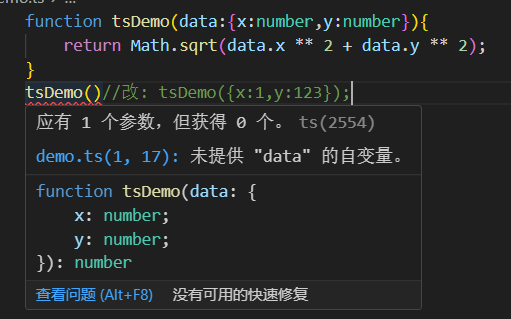
好处一: 写代码时有更好的错误提示
- ts 的静态类型使得我们可以在编写代码时, 就能够快速的发现一些潜在的问题
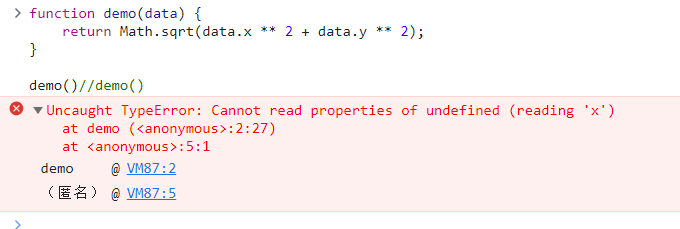
同样的 js 代码, 只有在线上运行的时候才会发现错误
好处二: 写 ts 代码时, 有更友好的编辑器自动提示
好处三: 代码语义更清晰易懂
- 通过静态类型的定义, 可以更好的阅读 ts 代码
function tsDemo(data:{x:number,y:number}){}安装工具 ts-node 运行 ts 代码
- npm install -g ts-node@8.4.1
- 运行 ts 代码: ts-node demo.ts //dell
interface Point {
  x: number;
  y: number;
}

function tsDemo(data: Point) {
  console.log("dell");
  return Math.sqrt(data.x ** 2 + data.y ** 2);
}
tsDemo({ x: 1, y: 123 });
TypeScript 基础语法入门
静态类型的深度理解
//自定义的静态类型
interface Point {
  x: number;
  y: number;
}
//point 这个变量上 具备 Point 类型的所有属性和方法
const point: Point = {
  x: 3,
  y: 4,
};
基础类型和对象类型
静态类型可以让我们更直观的判断变量或者对象属性的内容是什么
//基础类型 null,undefined,symbol,boolean,void
const count: number = 123;
const teacherName: string = "dj";

//对象类型
class Person {}
const teacher: {
  name: string;
  age: number;
} = {
  name: "dj",
  age: 18,
};

const numbers: number[] = [1, 2, 3];
const dj: Person = new Person();
const getTotal: () => number = () => {
  return 123;
};
类型注解和类型推断
- type annotation 类型注解,我们来告诉 ts 变量是什么类型
- type inference 类型推断,ts 会自动的去尝试分析变量的类型
//如果 ts 能自动分析变量类型,我们就什么也不需要做了
const firstNumber = 1;
const secondNumber = 2;
const total1 = firstNumber + secondNumber;

//如果 ts 无法分析变量类型的话,我们就需要使用类型注解
function getTo(firstNumber: number, secondNumber: number) {
    return firstNumber + secondNumber;
}

const total = getTo(1, 2)
函数相关类型
function add(first: number, second: number): number {
    return first + second;
}

//函数的返回值是 void
function sayHello(): void {
    console.log('hello')
}

//never: 永远不能执行到最后
function errorEmitter(): never {
    throw new Error();
    // console.log(123) 不能执行
    // while (true){} 后面的代码也执行不到
}

//解构赋值的类型注解的写法
function add1({first, second}: { first: number, second: number }): number {
    return first + second;
}

function getNumber({first}: { first: number }) {
    return first;
}

const total1 = add1({first: 1, second: 2})
const count = getNumber({first: 1})
基础语法复习
//基础类型, boolean,number,string,void,undefined,symbol,null
let count:number;
count=123;

//对象类型, {}, Class, function, []
const func=(str:string)=> {
    return parseInt(str, 10)
}
//: 后面跟着一般是类型,告诉函数:接收一个 string 类型的参数, 返回 number 值
//= 后面跟着是函数的具体实现
const func1:(str:string)=>number=(str)=>{
    return parseInt(str, 10)
}
const date=new Date();

//其他的 case
interface Person{
    name:'string'
}
const rawData='{"name":"dj"}';
const newData:Person=JSON.parse(rawData);

let temp:number|string=123;
temp='456';
数组和元组
/**
 * 数组
 */
//数组内容可以是 string/number
const arr: (number | string)[] = [1, 2, 3]
//数组内容只能是 undefined
const undefinedArr: undefined[] = [undefined];

//对象数组类型如何进行类型注解?
//类型别名: type alias
type User = { name: string, age: number }

const objectArr: User[] = [{
    name: 'dj',
    age: 22
}]

class Teacher {
    name: string;
    age: number;
}

/**
 * 类和手写的对象可以穿插的共同去使用
 * 传个对象进去, 虽然不是 teacher 生成的实例,但是里面也包含 name 和 age 属性,
 * 数据结构和 teacher 保持一致, 也是可以满足 teacher 这个类的要求
 * typescript 也是认为这样是 ok 的
 */
const objectArr1: Teacher[] = [
    new Teacher(),
    {
    name: 'dj',
    age: 22
}]
/**
 * 元组 tuple
 * 如果数组长度一定
 * 可以规定每一项的数据类型
 * 应用场景
 */
const teacherInfo:[string,string,number]=['dj','female',18]
//csv 文件
const teacherList:[string,string,number][]=[
    ['del','male',19],
    ['2w','male',8],
    ['22','male',50]
]
Interface 接口
/**
 * 最常用,interface 和 type 相类似,但并不完全一致
 * 接口就是在我们开发过程中,ts 帮助我们作语法提示(校验)的工具
 * 真正 ts 编译 js 的时候,ts 会把代码中接口的内容,包括类型的内容全部剔除掉
 */
interface Person {//只能代表一个函数或者对象
    name: string
    // readonly name: string //readonly 只能读,不能写
    age?: number//?代表:age 可有可无
    [propName:string]:any;//可能还有其他属性, 下方的 sex 就不会报错了
    say():string
}
//接口可以互相继承
interface Teacher extends Person{
    //具备 Person 的属性,还要有 teach()方法
    teach():string;
}
//可以定义一个函数类型,还可以定义数组这样的索引类型
interface SayHi{
    (word:string):string
}

/**
 * ts 的通用规范,如果能用接口去表述类型,就用接口;实在不行才用类型别名
 */
type Person1 = string;//类型别名: 区别->还可以代表基础类型

const getName = (person: Person) => {
    console.log(person.name)
}
const setName = (person: Person, name: string) => {
    person.name = name;
}
const person = {
    name: 'dj',
    sex:'male',
    say(){
        return 'say hello'
    }
}
getName(person)
// getName({//直接传字面量进去, ts 会对其进行强校验
//     name: 'dj',
//     sex:'male' //要报错
// })
setName(person, 'dl')

//类去应用这个 Person 接口, 要求类必须具备接口中的属性(name,say())
class User implements Person{
    name: 'dj';
    say(){
        return 'hello'
    }
}

const say:SayHi=(word:string)=>{
    return word
}
类的定义与继承
class Person {
    name = 'dj';

    getName() {
        return this.name;
    }
}

class Teacher extends Person {
    getTeacherName() {
        return 'teacher';
    }

    //如果写 getName()会把父类的覆盖掉,super 调用父类的方法
    getName() {
        return super.getName() + '-des'
    }
}

const teacher = new Teacher()
console.log(teacher.getName())//dj
console.log(teacher.getTeacherName())//teacher
类中的访问类型和构造器
/** 访问类型
 * public 允许我在类的内外被调用
 * private 允许在类内被使用
 * protected 允许在类内及继承的子类中使用
 */
class Person {
    protected name: string;
    public sayHi() {
        console.log('hi')
    }
}

class Teacher extends Person {
    public sayBye() {
        this.sayHi();
    }
}

const person = new Person()
// person.name='ds';//报错
// console.log(person.name)
person.sayHi()

/**
 * constructor
 */
class Person1{
    /** 传统写法
     * public name:string;
     * Person 在被实例化的时候,constructor 这个方法会被立即自动执行
     * constructor(name:string) {
     *   this.name=name;
     * }
     */
    //简化写法
    constructor(public name:string) {}
}
const person1=new Person1('dj')
console.log(person1.name)

class Person3{
    constructor(public name:string) {}
}
class Teacher3 extends Person3{
    constructor(public age:number) {
        super('dj');//调父类的构造函数
    }
}
const teacher3=new Teacher3(28)
console.log(teacher3)
静态属性,Setter 和 Getter ???
class Person {
    constructor(private _name: string) {
    }

    get name() {
        return this._name + 'le';
    }

    set name(name: string) {
        const realName = name.split(' ')[0];
        this._name = realName
    }
}

const person = new Person('djj');
console.log(person.name)
person.name = 'de le1';
console.log(person.name)

//单例模式:只能生成一个实例
class Demo {
    private static instance: Demo

    private constructor(public name:string) {
    }

    static getInstance() {
        if(!this.instance){
            this.instance=new Demo('dejj')
        }
        return this.instance;
    }
}
//demo1 和 demo2 就理论上是完全相等的东西了
const demo1 = Demo.getInstance()
const demo2 = Demo.getInstance()
console.log(demo1.name)
抽象类
//readonly: 只能读不能改
class Person {
    public readonly name: string;
    constructor(name: string) {
        this.name = name
    }
}
const person = new Person('ded');
console.log(person.name)

//抽象类, 只能被继承, 不能直接被实例化
abstract class Geom {
    width: number;
    getType() {
        return 'Geom';
    }
    abstract getArea(): number;
}
class Circle extends Geom {
    getArea() {
        return 123;
    }
}

//接口
interface Person1{
    name:string;
}
interface Teacher extends Person1{
    teacherAge:number
}
interface Student extends Person1{
    age:number
}
const teacher={
    name:'dell',
    teacherAge:33
}
const student={
    name:'lee',
    age:18
}
const getUserInfo=(user:Person1)=>{
    console.log(user.name)
}
getUserInfo(teacher)
getUserInfo(student)
TypeScript 语法进阶
- tsc --init
- tsconfig.json 中 [ 直接 tsc 命令可以使用 tsconfig.json 的配置] tsc-node 也可以
- 文档: https://www.tslang.cn/docs/handbook/compiler-options.html
{
  //  "files": ["./demo.ts"],//一样的
  "include": ["./demo.ts"],//可以指定编译哪个文件
  "compilerOptions": {
 // "incremental": true, //增量编译,只编译这次新增的内容
  "removeComments": true, //把 ts 对应的注释在编译中注释掉
  //    "strict": true,
  "noImplicitAny": true,//必须明确手动指定 anyfunction abc(name:any)
  "strictNullChecks": true,//强制对 null 进行检验
  "rootDir": "./src",//指定输入文件地址
  "outDir": "./build",//指定生成文件的位置
  "target": "es6",//变成 es6 语法
  "allowJs": true,//是否对 js 文件进行编译
  "checkJs": true, //检测 js 的语法
  "sourceMap": true,//打包的过程中输出 sourceMap
  "noUnusedLocals": true,//检测定义了没有被使用的,,例如 const teacher:string=null
  "noUnusedParameters": true,//对函数的参数进行校验
  }
}
联合类型和类型保护
interface Bird {
    fly: boolean;
    sing: () => {}
}

interface Dog {
    fly: boolean;
    bark: () => {}
}

//类型断言的方式,根据自身对逻辑的理解,可以规避潜在的问题
function trainAnimal(animal: Bird | Dog) {
    if (animal.fly) {//强制
        (animal as Bird).sing()
    } else {
        (animal as Dog).bark()
    }
}

//in 语法来做类型保护
function trainAnimalSecond(animal: Bird | Dog) {
    if ('sing' in animal) {
        animal.sing();
    } else {
        animal.bark()
    }
}

//typeof 语法来做类型保护
function add(first: string | number, second: string | number) {
    if (typeof first === 'string' || typeof second === 'string') {
        return `${first}${second}`;
    }
    return first + second;
}

//使用 instanceof 语法来做类型保护, 对数据结构的定义,只有类 Class 才具备可以被 instanceof 操作符调用的这种默认的行为
class NumberObj {
    count: number
}

function addSecond(first: object | NumberObj, second: object | NumberObj) {
    if (first instanceof NumberObj && second instanceof NumberObj) {
        return first.count + second.count
    }
    return 0;
}
Enum 枚举类型
enum Status{
    OFFLINE,//0
    ONLINE,//1
    DELETED//2
}

console.log(Status.OFFLINE,Status[0])//0 OFFLINE  不存在则 undefined

function getResult(status: number){
    if(status===Status.OFFLINE){
        return 'offline';
    }else if(status===Status.ONLINE){
        return 'online'
    }else if(status===Status.DELETED){
        return 'deleted'
    }
    return 'error'
}

const result = getResult(1);
console.log(result)//online
函数泛型(难点)
//泛型 generic 泛指的类型<T,P>
function join<T,P>(first: T, second: P) {
    return `${first}${second}`
}

function anotherJoin<T>(first: T, second: T):T {
    return first;
}

//T[] <-> Array<T>
function map<T>(params:T[]){
    return params
}

//指定 T 是 string, 则 first 和 second 都必须是 string 类型的
join<string,string>('1', '1')
join(1,'1')//类型推断
map<string>(['123'])
类中的泛型以及泛型类型
//1
class DataManager<T> {
    constructor(private data: T[]) {
    }

    getItem(index: number): T {
        return this.data[index]
    }
}

const data = new DataManager<string>(['1'])
data.getItem(0)

//2
interface Item {
    name: string
}

class DataManager1<T extends Item> {
    constructor(private data: T[]) {
    }

    getItem(index: number): string {
        return this.data[index].name
    }
}

const data1 = new DataManager1([
    {
        name: 'dsf'
    }
])

//3: T 这个泛型只能是 string 或 number
class DataManager2<T extends number | string> {
    constructor(private data: T[]) {
    }

    getItem(index: number): T {
        return this.data[index]
    }
}

const data3 = new DataManager2<string>([])

//4, 如何使用泛型作为一个具体的类型注解??
function hello<T>(params: T) {
    return params;
}

const func: <T>(params: T) => T = hello
命名空间-namespace
- npm init -y
- tsc -init
- 运行编译代码, tsc -w 会处于监听模式
//index.html
<!DOCTYPE html>
<html lang="en">
<head>
    <meta charset="UTF-8">
    <title>Title</title>
    <script src="./dist/page.js"></script>
</head>
<body>
<script>
    new Home.Page();//那些 HeaderContentFooter 是全局变量??
</script>
</body>
</html>
//page.ts
namespace Home {
class Header {
constructor() {
const elem = document.createElement('div')
elem.innerText = 'this is header'
document.body.appendChild(elem)
}
}
//只有 page 是全局变量,暴露出去
export class Page {
constructor() {
new Header();
}
}
}- 封装组件
- "outFile": "./dist/page.js",
"rootDir": "./src",
"outDir": "./dist",
- "outFile": "./dist/page.js",
//components.ts
 namespace Components {
 //在子命名空间也可以写其他的变量,类,接口,任何 ts 支持的语法
    export namespace SubComponents{
        export class Test{}
    }
    export interface User{
        name:string
    }
    export class Header {
        constructor() {
            const elem = document.createElement('div')
            elem.innerText = 'this is header'
            document.body.appendChild(elem)
        }
    }
}
//page.ts
//<reference path='./components.ts'/>
namespace Home {
//只有 page 是全局变量,暴露出去
export class Page {
user:Components.User={
name:'ssfs'
}
constructor() {
new Components.Header();
new Components.Content();
new Components.Footer();
}
}
}import 对应的模块化
- amd 规范的代码再浏览器中运行不起
- "module": "amd",
//page.ts
import { Header,Content,Footer} from './components'
export default class Page {
    constructor() {
        new Header();
    }
}
//components.ts
export class Header {
constructor() {
const elem = document.createElement('div')
elem.innerText = 'this is header'
document.body.appendChild(elem)
}
}<!DOCTYPE html>
<html lang="en">
<head>
<meta charset="UTF-8">
<title>Title</title>
<script src="https://cdnjs.cloudflare.com/ajax/libs/require.js/2.3.6/require.js"></script>
<script src="./dist/page.js"></script>
</head>
<body>
<script>
require(['page'],function (page){
new page.default()
})
</script>
</body>
</html>使用 Parcel 打包 TS 代码
- "parcel": "^2.0.0-alpha.3.2",
//index.html
<head>
    <script src="./page.ts" type="text/typescript"></script>
</head>
//package.json
"scripts": {
    "start": "parcel ./src/index.html"
  }
描述文件中的全局类型
- npm i --save-dev @types/jquery
//index.html
<script src="https://cdn.bootcdn.net/ajax/libs/jquery/3.4.1/jquery.js"></script>
//jquery.d.ts
/**
* 类型定义文件里面,去对全局的函数进行定义
* 帮助 ts 文件, 理解我们引入的 js 文件或者 js 库里面的内容
* 因为 js 库里面没有 ts 要求的类型的概念
*/
//定义全局变量
declare var $: (param: () => void) => void//函数,返回值是空
//定义全局函数
interface JqueryInstance {
html: (html: string) => JqueryInstance
}
//函数重载
declare function $(readyFunc: () => void): void;
declare function $(selector: string): JqueryInstance
//(2)如何对对象/类进行类型定义,以及命名空间的嵌套
declare namespace $ {
namespace fn{
class init {}
}
}
//(1)使用了 interface 的语法,实现函数重载
// interface JQuery{
// (readyFunc: () => void): void;
// (selector: string):JqueryInstance
// }
// declare var $:JQuery//page.ts
$(function (){
$('body').html('<div>123</div>')
})//123
new $.fn.init()//(2)模块代码的类型描述文件
- npm install jquery --save
//jquery.d.ts
//ES6 模块化
declare module 'jquery' {
    interface JqueryInstance {
        html: (html: string) => JqueryInstance
    }

    //混合类型
    function $(readyFunc: () => void): void;
    function $(selector: string): JqueryInstance
    namespace $ {
        namespace fn {
            class init {
            }
        }
    }
    export =$
}
//page.ts
import $ from 'jquery'
$(function (){
$('body').html('<div>1dd23</div>')
new $.fn.init()
})泛型中 keyof 语法的使用
//page.ts
interface Person {
    name: string;
    age: number;
    gender: string;
}

/**
 * 如果有个类里有个对象,想根据 key 或 index 去获得对象的某个内容
 * 又想推断出正确的返回内容的类型↓
 */
//T extends 'name'<=>type T='name' -> key:'name'
//Person[T] => Person['name']
class Teacher {
    constructor(private info: Person) {
    }
    //↑ 就可以用这种
    getInfo<T extends keyof Person>(key: T) :Person[T]{
        return this.info[key]
    }
}

const teacher = new Teacher({
    name: 'del',
    age: 18,
    gender: 'male'
})
const test = teacher.getInfo('name')
console.log(test)
TypeScript 高级语法
类的装饰器
- npm init -y
- tsc --init
- npm install ts-node -D
- npm install typescript --save
 "experimentalDecorators": true,
"emitDecoratorMetadata": true,- simple_decorator.ts : 语法提示并不完善
/**
 * 类的装饰器
 * 装饰器本身是一个函数
 * 通过@符号来使用
 * 在类创建好的时候立即实现
 * 类装饰器接收的参数是构造函数
 * 用多个装饰器时,从下到上, 从右到左的顺序执行
 */
function testDecorator(flag:boolean){
    if(flag){
        return  function (constructor:any){
            constructor.prototype.getName=()=>{
                console.log('dj')
            }
        }
    }else {
        return function (constructor:any){}
    }

}

@testDecorator(true)
class Test{}
const test=new Test();
(test as any).getName()- index.ts : 如果你增加的这个方法 getName() 在原来的类 class {}上没有的, 则需要通过这种 factory 工厂函数的形式, 去对原来的类做一下装饰器的修饰, 然后生成一个新的类给到 Test, 再去创造类的实例的时候, 就能够通过语法提示, 使用新增的一些类的方法了, test.getName()
/**
 * new (...args:any[])=>any  构造函数
 * T 类或者包含构造函数的一种东西
 */
function testDecorator1() {
  return function <T extends new (...args: any[]) => any>(constructor: T) {
    return class extends constructor {
      name = 'wbl';
      getName() {
        return this.name
      }
    }
  }
}

const Test1 = testDecorator1()(
  class {
    name: string;

    constructor(name: string) {
      this.name = name
    }
  })

const test = new Test1('de');
console.log(test.getName())
方法装饰器
/**
 * 普通方法,target 对应的是类的 prototype
 * 静态方法, target 对应的是类的构造函数
 */
function getNameDecorator(target: any, key: string,descriptor:PropertyDescriptor) {
  // console.log(target, key)
  //false 不可被重写
  // descriptor.writable=true
  descriptor.value=function (){
    return 'descriptor'
  }
}

class Test {
  name: string;

  constructor(name: string) {
    this.name = name
  }

  @getNameDecorator
  getName() {
    return this.name
  }

  // static getName(){
  //   return '123'//[class Test] getName
  // }
}

const test = new Test('de');
// test.getName=()=>{//被重写
//   return '123'
// }
console.log(test.getName())
访问器的装饰器
function visitDecorator(target: any, key: string,descriptor:PropertyDescriptor) {
  descriptor.writable=true
}

class Test {
  private _name: string;

  constructor(name: string) {
    this._name = name
  }

  get name() {
    return this._name
  }
  @visitDecorator //get 和 set 不能同时用
  set name(name:string){
    this._name=name;
  }
}

const test = new Test('dedd');
test.name='123123123'
console.log(test.name)
属性的装饰器
// function nameDecorator(target: any, key: string):any {
//   //false: name 就不能修改
//   const descriptor:PropertyDescriptor={
//     writable:true
//   }
//   return descriptor
// }
//修改的并不是实例上的 name, 而是原型上的 name
function nameDecorator(target: any, key: string):any {
  target[key]='789789'
}
//name 放在实例上
class Test {
  @nameDecorator
  name='djjjj'
}

const test = new Test();
// test.name='1234546'//可以被修改
console.log((test as any).__proto__.name)
参数装饰器
/**
 *
 * @param target 原型
 * @param method 方法名
 * @param paramIndex 参数所在的位置
 */
function paramDecorator(target: any, method: string,paramIndex:number) {
  console.log(target,method,paramIndex)
}

//name 放在实例上
class Test {
 getInfo(@paramDecorator name:string,age:number){
   console.log(name,age)
 }
}

const test = new Test();
test.getInfo('dj',32)
//{} getInfo 0
// dj 32
装饰器实际使用的小例子
const userInfo: any = undefined
//捕获异常
function catchError(msg:string){
  return  function (target: any, key: string, descriptor: PropertyDescriptor) {
    const fn = descriptor.value
    descriptor.value = function () {
      try {
        fn();
      } catch (e) {
        console.log(msg)
      }
    }
  }
}

class Test {
  @catchError('userInfo.name 不存在')
  getName() {
    return userInfo.name
  }
  @catchError('userInfo.age 不存在')
  getAge() {
      return userInfo.age
  }
}

const test = new Test()
test.getName()
test.getAge()


