Vite 特点
- 开发时效率极高
- 开箱即用
- 社区丰富,兼容 rollup
- 超高速热重载
- 预设应用和类库打包模式
- 前端类库无关
- 启动项目很快
- 每次修改文件可以实时更新,不像 vuecli 的项目需要好几秒才可以看到结果
- 项目到一定规模后, bite 速度稳定
![]()
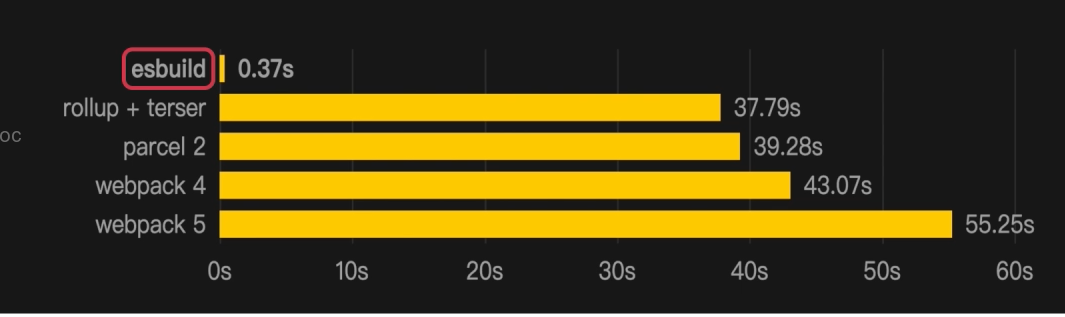
Vite 的使用
- 各种前端框架集成
- Css,图片,Wasm 之类的第三方资源加载
- Typescript,JSX 不同语法集成
- glob import
- 预编译文件
- 后端(node.js)集成
Vite 有自身的插件系统
- 生态: 兼容 rollup 插件
- rollup,esbuild 学习
- Vite 插件 API 详解
- 官方插件用例详解
什么是 Vite
-
是构建工具的高阶封装, 起初是专为 Vue 服务的, V2 转为框架无关的工具
中文文档: https://cn.vitejs.dev/guide/ -
使用简单, 配置项少, 底层用 rollup, 兼容了其插件, (使用上比 vuecli, app, webpack 简单得多)
-
集成了开发服务器 (dev server), 不需要像 webpack 一样额外安装类似 webpack-dev-server 这样的依赖还要配置使用。
-
启动项目快(得益于 vite 自己的架构, es6 的速度)
-
便于扩展
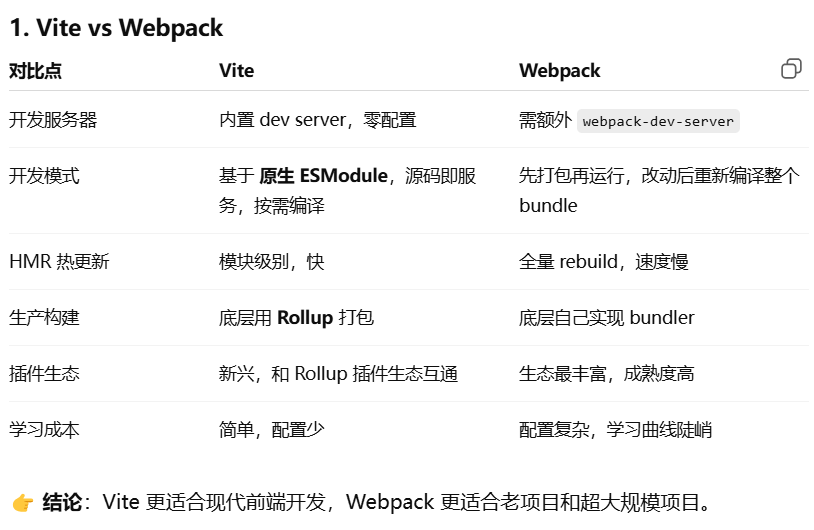
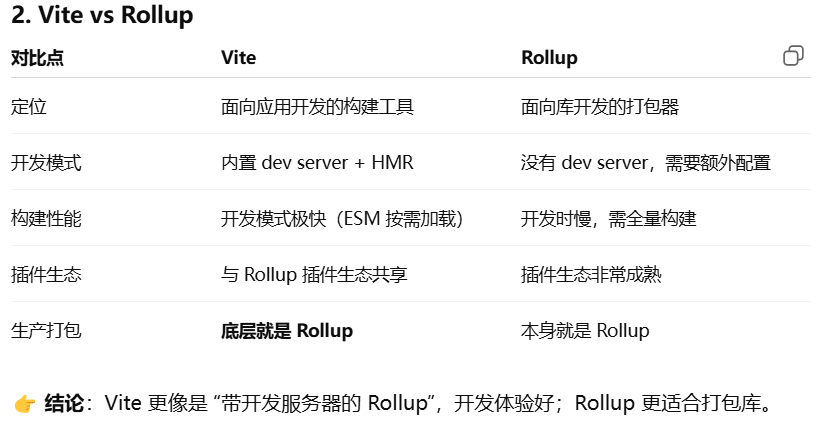
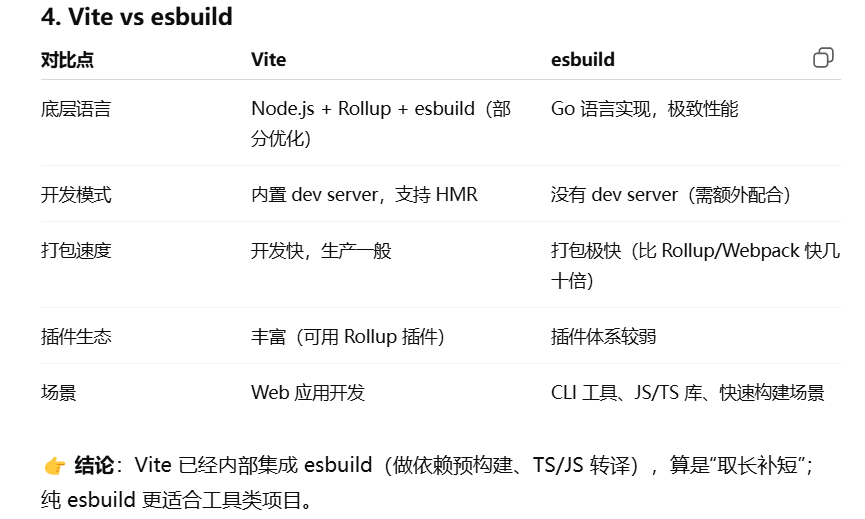
Vite 对比其他构建工具的优势
区别:
- High Level API
- 不包含自己编译能力
- 完全基于 ESM 加载方式的开发时
webpack 更全面, rollup 更专一, Vite 更好用(为项目而生的, 而不是为构建而生的, 减少了很多配置量[内置 dev server 和 build 命令, 各类 loader, ])
Vite 创建 Vue3 项目
- 1.0 以 Vue3 为主
- 2.0, 跨框架√
- npm init vite
- vite 入口是 index.html 文件
- npm i @vitejs/plugin-vue-jsx -D
import { defineConfig } from 'vite'
import vue from '@vitejs/plugin-vue'
import vueJsx from '@vitejs/plugin-vue-jsx'
export default defineConfig({
  plugins: [vue(),vueJsx()],
})- 新增 App.jsx
import { defineComponent}   from "vue";
export default defineComponent({
  name: "App",
  setup() {
    return () => {
        return  <div>Hello Vite + Vue!</div>
    };
  },
});- main.js
import { createApp } from 'vue'
import './style.css'
import App from './App'

createApp(App).mount('#app')
Vite 创建 Vue2 的项目
- npm init vite
- 创建 vite.config.js
import { createVuePlugin } from 'vite-plugin-vue2'
export default {
    plugins:[createVuePlugin()]
}- yarn add vite-plugin-vue2
- yarn add vue -S
- src/main.js
import  Vue from "vue"
import App from "./App.vue"
new Vue({
  el:"#app",
    render:(h)=>h(App)
}).$mount()
vite-vue2 模板:
https://github.com/logue/vite-vue2-ts-starter
Vite 创建 React 的项目
- fastRefresh
- 解决很多 rhl 无法解决的问题
- 速度更快
- 支持局部更新
npm init vite
yarn create @vitejs/app
Vite 中使用 CSS 的各种功能
CSS 变量 原生 CSS Variables
@import alias
postcss
css-modules
css pre-processors
Vite 中使用 Typescript??
- 只编译成 js, 可以在浏览器中显示, 不校验
- tsc --noEmit
Vite 中处理静态资源的方法?
// import test from "./test?url" //文件路径
import test from "./test?raw" //文件代码以字符串返回
console.log(test)
Vite 集成 eslint 和 prettier
- 新建文件.eslintrc.js
module.exports = {
    extends: "standard",
    globals: {
        postMessage: true
    },
    rules: {
        'space-before-function-paren': 'off'
    }
}-
yarn add eslint-config-standard eslint-plugin-import eslint-plugin-promise eslint-plugin-node -D
-
新建文件.prettierrc, 安装 prettier 插件
{ "singleQuote": true,//单引号 "semi": false//分号 } -
package.json 命名, eslint 校验不通过的内容
"lint": "eslint --ext js src/" -
未通过校验, 阻止 git commit 推送
yarn add husky -D
npx husky install
npx husky add husky/pre-commit "npm run lit"
Vite 中的 env 环境变量
- Build In
MODE
BASEURL
PROD
DEV
在.env 文件自定义, 变量前缀需加上 VITE
.env.development 开发环境
.env.production 生产环境
.env.development.local 本地开发 - 通过 mode, 改变环境变量读取的方式
.env.test
"dev": "vite --mode test",
Vite 的高级应用
Vite 中的 HMR 热更新功能
- main.js
import './style.css'
function render(){
document.querySelector('#app').innerHTML = `
34111
`
}
render()
if(import.meta.hot){
import.meta.hot.accept((newModule)=>newModule.render())
}
Vite 的 glob-import 批量导入功能
例如, 不同语言包文件
(vite5 版本以上 globEager 已废弃)
//引入文件夹所有 js 文件 eg: test-1.js : './*-[0-9]/*.js'
const globModules=import.meta.glob('./*.js')
Object.entries(globModules).forEach(([path,module])=>{
console.log( path, module)
module().then(m=>console.log(path+':'+m.default))
})
Vite 配置项官网
[Vite 官方中文文档](https://cn.vitejs.dev/config/shared-options.html "Vite 官方中文文档")
Rollup
介绍
- 以 ESM 标准为目标的构建工具
- Tree Shaking
- npm i -g rollup
- mkdir rollup-test
- 新建 index.js
- rollup -i index.js --file dist.js
- rollup -i index.js --file dist.js --format umd
- ....↑ es/cjs/iife
命令行使用
- rollup -v
- rollup -i index.js -i a.js --dir dist
- rollup -i index.js --format iife/cjs/es/umd
- rollup -i index.js --file dist.js --format umd
import path from 'path';
import React from 'react';
console.log('just a test',path.join("","/hello"),React.useEffect());
export const x=12
![]()
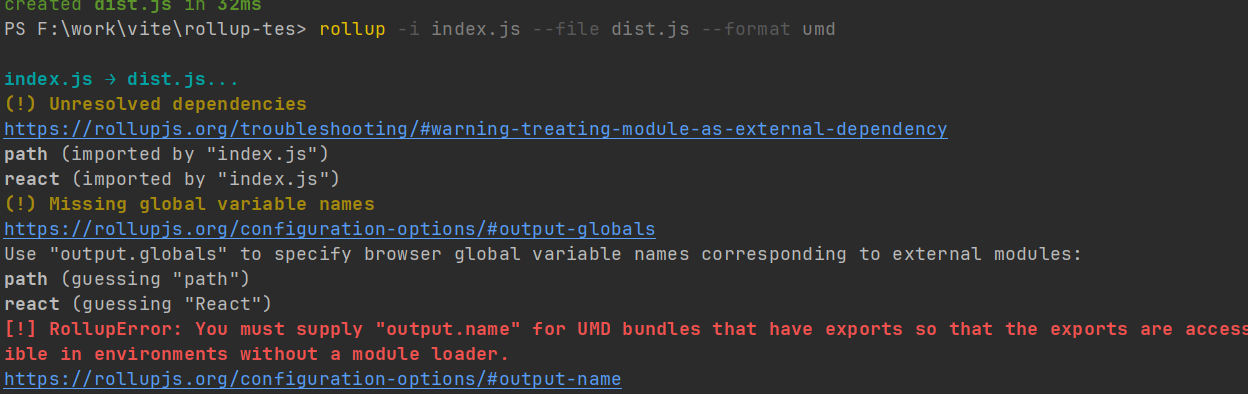
- rollup -i index.js --file dist.js --format umd --name Index [解决上述报错]
- 实时监听源文件变化, 触发 rollup 重新打包 rollup -i index.js --file dist.js --format umd --name Index --watch
rollup.config.js
- rollup --config rollup.config.js
export default {
input: 'index.js',
output: {
file: 'dist.js',
format: 'umd',
name: 'Index'
}
}
- 插件:@rollup/plugin-json


