前端数据交互与 HTTP 协议
初始前后端通信
- 1.前后端通信是什么
前端和后端数据交互的过程
浏览器和服务器之间数据交互的过程 - 2.后端向前端发送数据
访问页面 - 3.前端向后端发送数据
用户注册
前后端通信的过程与概念解释
- 就是在 '请求-响应'中完成的
- 前端:浏览器端
- 客户端:只要能和服务器通信的叫客户端
- 命令行工具
curl https:www.imooc.com - 后端:服务器端
前后端的通信方式
- 1.使用浏览器访问网页
在浏览器中输入网址,按下回车 - 2.html 的标签
- 浏览器在解析 HTML 标签的时候,遇到一些特殊的标签,会再次向服务器发送请求
- link/img/script/iframe
- 还有一些标签,浏览器解析的时候,不会向服务器发送请求,但是用户可以使用他们向服务器发送请求
a/form
- 3.Ajax 和 Fetch
初识 HTTP
HyperText Transfer Protocol
超文本传输协议
- 超文本:原先一个个单一的文本,通过超链接将其联系起来。由原先的单一的文本变成了可无限延伸、扩展的超级文本、立体文本
- HTML、JS、CSS、图片、字体、音频、视频等等文件,都是通过 HTTP(超文本传输协议)在服务器和浏览器之间传输
- 每一次前后端通信,前端需要主动向后端发出请求,后端接收到前端的请求后,可以给出响应
- HTTP 是一个请求-响应协议
2.HTTP 请求响应过程
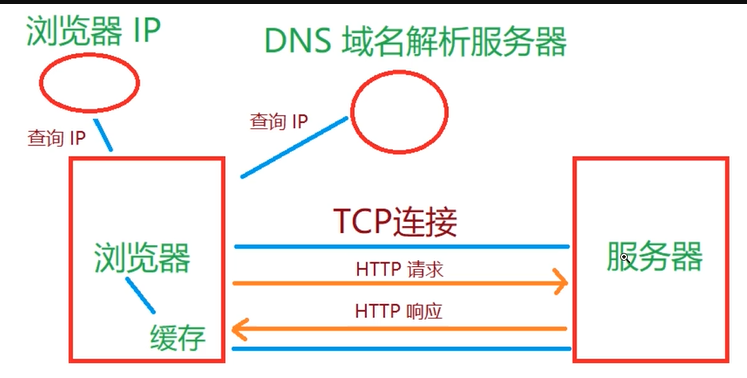
HTTP 报文
- 浏览器向服务器发送请求时,请求本身就是信息,叫请求报文
- 服务器向浏览器发送响应时传输的信息,叫响应报文
2.HTTP 报文格式
请求头:起始行+首部
请求体
响应头:起始行+首部
响应体
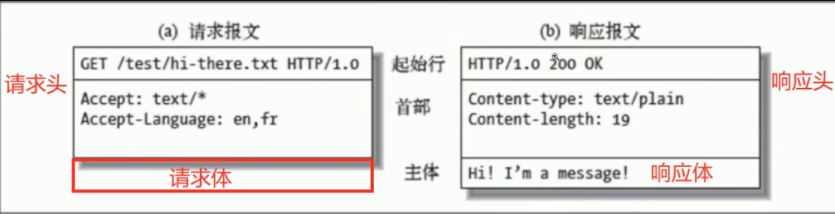
- GET 请求,没有请求体[一般来发送数据的],数据通过请求头携带
- POST 请求,有请求体,数据通过请求体携带
HTTP 方法
-
1.常用的 HTTP 方法
- 浏览器发送请求时采用的方法,和响应无关
- GET,POST,PUT,DELETE
- 用来定义对于资源采取什么样的操作的,有各自的语义
-
2.HTTP 方法的语义
-
GET 获取数据
获取资源(文件) -
POST 创建数据
注册 -
PUT 更新数据
修改个人信息,修改密码 -
DELETE 删除数据
删除一条评论 -
增删改查
-
这些方法虽然有各自的语义,但是并不是强制性的
3.RESTFul 接口设计
-
一种接口设计风格,充分利用 HTTP 方法的语义
-
通过用户 ID 获取个人信息,使用 GET 方法
https://www.imooc.com/api/http/getUser?id=1
//GET
https://www.imooc.com/api/http/user?id=1 -
注册新用户,使用 POST 方法
https://www.imooc.com/api/http/addUser
//POST
https://www.imooc.com/api/http/user -
修改一个用户,使用 POST 方法
https://www.imooc.com/api/http/modifyUser
//PUT
https://www.imooc.com/api/http/user -
删除一个用户,使用 POST 方法
https://www.imooc.com/api/http/deleteUser
//DELETE
https://www.imooc.com/api/http/user
GET 和 POST 方法的对比
-
1.语义
GET:获取数据
POST:创建数据 -
2.发送数据
- GET 通过地址在请求体中携带数据
- 能携带的数据量和地址的长度有关系,一般最多就几 K
- POST 既可以通过地址在请求头中携带数据,也可以通过请求体携带数据
- 能携带的数据量理论上是无限的
-
携带少量数据,可以使用 GET 请求,大量的数据可以使用 POST 请求
-
3.缓存
GET 可以被缓存,POST 不会被缓存 -
4.安全性
GET 和 POST 都不安全- 发送密码或其他敏感信息时不要使用 GET,主要是避免直接被他人窥屏或通过历史记录找到你的密码
HTTP 状态码
- 定义服务器对请求的处理结果,是服务器返回的
-
HTTP 状态码的语义
-
100~199 消息:代表请求已被接受,需要继续处理
websocket -
200~299 成功
-
300~399 重定向
-
- 301 Moved Permanently 永久性重定向
- 302 Move Temporarily
- 304 Not Modified
- 400~499 请求错误
- 404 Not Found
- 500~599 服务器错误
- 500 Internal Server Error
本地存储
初识 Cookie
-
Cookie 全称 HTTP Cookie,简称 Cookie
- 是浏览器存储数据的一种方式
- 因为存储在用户本地,而不是存储在服务器上,是本地存储
- 一般会自动随着浏览器每次请求发送到服务器端
-
Cookie 有什么用
- 利用 Cookie 跟踪统计用户访问该网站的习惯,比如什么时间访问,访问了哪些页面,在每个网页的停留时间等
-
3.在浏览器中操作 Cookie
不要在 Cookie 中保存密码等敏感信息
Cookie 的基本用法
        //1.写入 Cookie
        // document.cookie='username=zs';
        // document.cookie='age=18';
        //不能一起设置,只能一个个设置
        //2.读取 Cookie
        console.log(document.cookie);
        //读取的是一个由名值对构成的字符串,
        // 每个名值对之间由";" (一个分号和一个空格)隔开
        age=18; username=zs
Cookie 的属性
主要掌握
1.Cookie 的名称(Name)和值(Value)
2.失效(到期时间)
       //1.Cookie 的名称(Name)和值(Value)
       //最重要的两个属性,创建 Cookie 时必须填写,其他属性可以使用默认值
       //Cookie 的名称或值如果包含非英文字母,
       //则写入时需要使用 encodeURIComponent()编码,
       //读取时使用 decodeURIComponent()解码
       // document.cookie=username=${encodeURIComponent('张三')};
       // document.cookie=${encodeURIComponent('用户名')}=${encodeURIComponent('张三')};
       //一般名称使用英文字母,不要用中文,值可以用中文,但是要编码
       //2.失效(到期时间)
       //对于失效的 Cookie,会被浏览器清除
       //如果没有设置失效(到期)时间,这样的 Cookie 称为会话 Cookie
       //它存在内存中,当会话结束,也就是浏览器关闭时,Cookie 消失
       //想长时间存在,设置 Expires 或 Max-Age
       //expires
       //值为 Date 类型
       // document.cookie=username=alex;expires=${new Date('2100-1-01 00:00:00')};
       //max-age
       //值为数字,表示当前时间+多少秒后过期,单位是秒
       // document.cookie='username=alex;max-age=5';
       // document.cookie='username=alex;max-age=${24*3600*30}`;//30 天
       //如果 max-age 的值是 0 或负数,则 Cookie 会被删除
       // document.cookie='username=alex;';
       // document.cookie='username=alex;max-age=0';
       // document.cookie='username=alex;max-age=-1';
       //3.Domain 域
       //Domain 限定了访问 Cookie 的范围
       //使用 JS 只能读写当前域或父域的 Cookie,无法读写其他域的 Cookie
       document.cookie='username=alex;domain=www.imooc.com';
       //www.imooc.com m.imooc.com 当前域
       //父域: .imooc.com
       //4.Path 路径
       //Path 限定了访问 Cookie 的范围(同一域名下)
       //使用 JS 只能读写当前路径和上级路径的 Cookie,无法读写下级路径的 Cookie
       //document.cookie='username=alex;path=/course/list';
       //当 Name、Domain、Path 这 3 个字段都相同的时候,才是同一个 Cookie
       //5.HttpOnly
       //设置了 HttpOnly 属性的 Cookie 不能通过 JS 去访问
       //6.Secure 安全标志
       //Secure 限定了只有在使用了 https 而不是 http 的情况下才可以发送给服务端
       //Domain、Path、Secure 都要满足条件,还不能过期的 Cookie 才能随着请求发送到服务器端
localStorage
- 1.localStorage 也是一种浏览器存储数据的方式(本地存储),它只是存储在本地,不会发送到服务器端
- 单个域名下的 localStorage 总大小有限制
- 2.在浏览器中操作 localStorage
- 3.localStorage 的基本用法
 //setItem()
        localStorage.setItem('username','ale');
        localStorage.setItem('username','zs');
        localStorage.setItem('age',18);
        localStorage.setItem('sex','male');
        //length
        console.log(localStorage.length);
        console.log(localStorage);
        //getItem()
        console.log(localStorage.getItem('username'));
        console.log(localStorage.getItem('age'));
        //获取不存在的返回 null
        console.log(localStorage.getItem('name'));
        //removeItem()
        localStorage.removeItem('username');
        localStorage.removeItem('age');
        //删除不存在的 key,不报错
        localStorage.removeItem('name');
        //clear
        localStorage.clear();
console.log(localStorage);- 4.使用 localStorage 实现自动填充
const loginForm=document.getElementById('login');
        const btn=document.getElementById('btn');
        const username=localStorage.getItem('username');
        if (username){
            loginForm.username.value=username;
        }
        btn.addEventListener('click',e=>{
            e.preventDefault();
            //数据验证
            //console.log(loginForm.username.value);
            localStorage.setItem('username',loginForm.username.value);
            loginForm.submit();
        },false);
localStorage 的注意事项
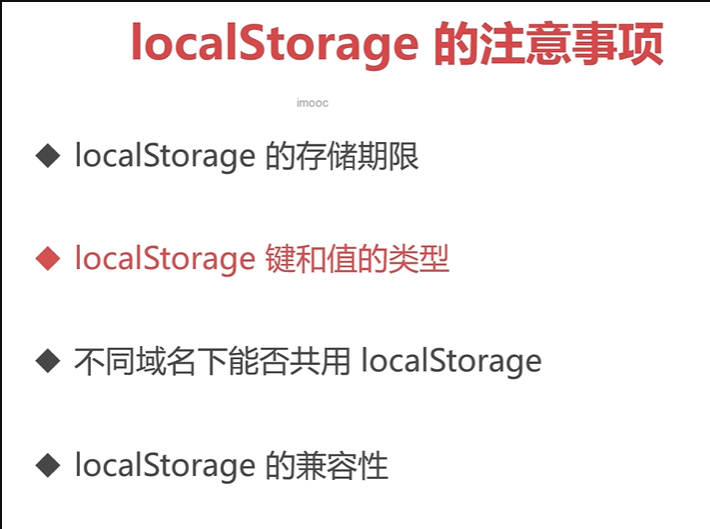
- 1.localStorage 的存储期限
localStorage 是持久化的本地存储,除非手动清除(比如通过 js 删除,或者清除浏览器缓存),否则数据是永远不会过期的 - sessionStorage
当会话结束(比如关闭浏览器)的时候,sessionStorage 中的数据会被清空
sessionStorage.setItem('username','sf');
        sessionStorage.getItem('username');
        sessionStorage.removeItem('username');
sessionStorage.clear();- 2.localStorage 键和值的类型
localStorage 存储的键和值只能是字符串类型
不是字符串类型,也会先转化成字符串类型再存进去
localStorage.setItem({},18);
        console.log(typeof localStorage.getItem('[object Object]'),
        localStorage.getItem('[object Object]'));//string 18
console.log({},toString());-
3.不同域名下不能共用 localStorage 的
-
4.localStorage 的兼容性
IE7 及以下版本不支持 localStorage,IE8 开始支持
caniuse.com
Ajax&Fetch 与跨域请求
初识 Ajax
         //1.Ajax 是什么
        //Ajax 是 Asynchronous JavaScript and XML(异步 JavaScript 和 XML)的简写
        //Ajax 中的异步:可以异步地向服务器发送请求,在等待响应的过程中,
        //不会阻塞当前页面,浏览器可以做自己的事情。直到成功获取响应后,
        //浏览器才开始处理响应数据
        //XML (可扩展标记语言) 是前后端数据通信时传输数据的一种格式
        //XML 很少用了,现在比较常用是 JSON
        //Ajax 其实就是浏览器与服务器之间的一种异步通信方式
        //使用 Ajax 可以在不重新加载整个页面的情况下,对页面的某部分进行更新
        //慕课网注册检测  搜索提示
        //2.搭建 Ajax 开发环境
        //Ajax 需要服务器环境,非服务器环境下,很多浏览器无法正常使用 Ajax
Ajax 的基本用法
- 4:完成。已经接收到全部响应数据,而且已经可以在浏览器中使用了
  //1.XMLHttpRequest
       //Ajax 想要实现浏览器与服务器之间的异步通信,需要依靠 XMLHttpRequest,它是一个构造函数
       //不论是 XMLHttpRequest,还是 Ajax,都没有和具体的某种数据格式绑定
       //2.Ajax 的使用步骤
       //2.1 创建 xhr 对象
       const xhr=new XMLHttpRequest();
       //2.2 监听事件,处理响应
       //当获取到响应后,会触发 xhr 对象的 readystatechange 事件,可以在该事件中对响应进行处理
       xhr.onreadystatechange=()=>{
           if (xhr.readyState!==4)return;
           //HTTP CODE
           //获取到响应后,响应的内容会自动填充 xhr 对象的属性
           //xhr.statusText:HTTP 状态说明 OK Not Found
           if ((xhr.status>=200)&(xhr.status<300)||(xhr.status===304)){
               // console.log('正常使用响应数据');
               console.log(xhr.responseText);
           }
       };
       //注意:
       //readystatechange 事件也可以配合 addEventListener 使用,
       // 不过要注意,IE6~8 不支持 addEventListener
       //为了兼容性,readystatechange 中不使用 this,而是直接使用 xhr
       //由于兼容性问题,最好放在 open 之前
       //readystatechange 事件监听 readyState 这个状态的变化
       // 它的值从 0~4,一共 5 个状态
       //0:未初始化。尚未调用 open()
       // 1:启动。已经调用 open),但尚未调用 send()
       // 2:发送。已经调用 send(),但尚未接收到响应
       // 3:接收。已经接收到部分响应数据
       ///4:完成。已经接收到全部响应数据,而且已经可以在浏览器中使用了
       //2.3 准备发送请求
       // xhr.open('HTTP 方法 GET,POST,PUT,DELETE',
       //     '地址 URLhttps://www.imooc.com/api/http/search/suggest?' +
       //     'words=js ./index.html ./index.xml ./index.txt',true);//异步
       //调用 open 并不会真正发送请求,而只是做好发送请求前的准备工作
       //2.4 发送请求
       //调用 send()正式发送请求
       //xhr.send(null);
//3.使用 Ajax 完成前后端通信
       const url='https://www.imooc.com/api/http/search/suggest?words=js';
       const xhr=new XMLHttpRequest();
       xhr.onreadystatechange=()=>{
           if (xhr.readyState!==4)return;//还没准备好
           if ((xhr.status>=200&&xhr.status<300)||xhr.status===304){//成功||可以使用缓存
               console.log(xhr.responseText);
               console.log(typeof xhr.responseText);
           }
       };
       xhr.open('GET',url,true);
       xhr.send(null);
GET 请求
-
1.携带数据
- GET 请求不能通过请求体携带数据,但可以通过请求头携带
-
2.数据编码
- 如果携带的数据是非英文字母的话,比如说汉字,就需要编码之后再发送给后端,不然会造成乱码问题
- 可以使用 encodeURIComponent() 编码
const url = `https://www.imooc.com/api/http/search/suggest?words=${encodeURIComponent(
        '前端'
      )}`;
类似上面
POST 请求
// 1.携带数据
      // POST 请求主要通过请求体携带数据,同时也可以通过请求头携带
      const url = 'https://www.imooc.com/api/http/search/suggest?words=js';
 类似 get
      // 如果想发送数据,直接写在 send() 的参数位置,一般是字符串
      // xhr.send('username=alex&age=18');
      // 不能直接传递对象,需要先将对象转换成字符串的形式
      xhr.send({
        username: 'alex',
        age: 18
      });// 请求载荷: [object Object]
      // 2.数据编码
      xhr.send(username=${encodeURIComponent('张三')}&age=18);
初识 JSON
 // 1.JSON 是什么
      // Ajax 发送和接收数据的一种格式
      // XML
      // username=alex&age=18
      // JSON
      // {"code":200,"data":[{"word":"jsp"},{"word":"js"},{"word":"json"},{"word":"js \u5165\u95e8"},{"word":"jstl"}]}
      // HTML/XML
      // JSON 全称是 JavaScript Object Notation
      // 2.为什么需要 JSON
      //  JSON 有 3 种形式,每种形式的写法都和 JS 中的数据类型很像,可以很轻松的和 JS 中的数据类型互相转换
      // JS->JSON->PHP/Java
      // PHP/Java->JSON->JS
JSON 的 3 种形式
- 1.简答值形式
如上
 xhr.open('GET', './plain.json', true);
 xhr.send(null);
 plain.json:
"str" 5-
2.对象形式
xhr.open('GET', './obj.json', true); { "name": "张三", "age": 18, "hobby": ["足球","乒乓球"], "family": "张老大", "mother": "李四" } -
3.数组形式
xhr.open('GET', './arr.json', true);
[
  {
    "id": 1,
    "username": "张三",
    "comment": "666"
  },
  {
    "id": 2,
    "username": "李四",
    "comment": "999"
  }
]
// 1.简单值形式
// .json
// JSON 的简单值形式就对应着 JS 中的基础数据类型
// 数字、字符串、布尔值、null
// 注意事项
// ① JSON 中没有 undefined 值
// ② JSON 中的字符串必须使用双引号
// ③ JSON 中是不能注释的
// 2.对象形式
// JSON 的对象形式就对应着 JS 中的对象
// 注意事项
// JSON 中对象的属性名必须用双引号,属性值如果是字符串也必须用双引号
// JSON 中只要涉及到字符串,就必须使用双引号
// 不支持 undefined
// 3.数组形式
// JSON 的数组形式就对应着 JS 中的数组
// [1, "hi", null]
// 注意事项
// 数组中的字符串必须用双引号
// JSON 中只要涉及到字符串,就必须使用双引号
// 不支持 undefinedJSON 的常用方法
 <script type="module">
        //1.JSON.parse()可以将 JSON 格式的字符串解析成 JS 中的对应值
        //一定要是合法的 JSON 字符串,否则会报错
        // const xhr=new XMLHttpRequest();
        // xhr.onreadystatechange=()=>{
        //     if (xhr.readyState!==4)return;
        //     if ((xhr.status>=200&&xhr.status<300)||xhr.status===304){
        //         console.log(xhr.responseText);
        //         console.log(typeof xhr.responseText);
        //
        //         console.log(JSON.parse(xhr.responseText));
        //         console.log(JSON.parse(xhr.responseText).data);
        //     }
        // };
        // xhr.open('GET', './arr.json',true);
        // xhr.send(null);
        //2.JSON.stringify()可以将 JS 的基本数据类型,
        // 对象或者数组转换成 JSON 格式的字符串
        // const xhr=new XMLHttpRequest();
        // xhr.open('POST','https://www.imooc.com/api/http/search/suggest?words=js',true);
        // xhr.send(
        //     JSON.stringify({
        //         username:'alex',
        //         age:18
        //     })
        // );//{"username":"alex","age":18}
        // 3.使用 JSON.parse() 和 JSON.stringify() 封装 localStorage
        import {get,set,remove,clear} from './storage.js';
        set('username','al');
        console.log(get('username'));
        set('zs', {
            name: '张三',
            age: 18
        });
        console.log(get('zs'));
        // remove('username');
        // clear();
初识跨域
 //1.跨域是什么
    //同域,不是跨域
    const url = './index.html';
    //不同域,跨域,被浏览器阻止
    const xhr = new XMLHttpRequest();
    //向一个域发送请求,如果要请求的域和当前域是不同域,就叫跨域
    //不同域之间的请求,就是跨域请求
    xhr.onreadystatechange = () => {
        if (xhr.readyState !== 4) return;
        if ((xhr.status >= 200 && xhr.status < 300) || xhr.status === 304) {
            console.log(xhr.responseText);
        }
    };
    xhr.open('GET', url, true);
    xhr.send(null);
    //2.什么是不同域,什么是同域
    //https(协议)://www.imooc.com(域名):443(端口号)/course/list(路径)
    //协议,域名,端口号,任何一个不一样,就是不同域
    //与路径无关,路径一不一样无所谓
    // 不同域
    // https://www.imooc.com:443/course/list
    // http://www.imooc.com:80/course/list
    // http://www.imooc.com:80/course/list
    // http://m.imooc.com:80/course/list
    // http://imooc.com:80/course/list
    // 同域
    // http://imooc.com:80
    // http://imooc.com:80/course/list
    //3.跨域请求为什么会被阻止
    //阻止跨域请求,其实是浏览器本身的一种安全策略--同源策略
    //其他客户端或者服务器都不存在跨域被阻止的问题
    //4.跨域解决方案
    //①CORS 跨域资源共享
    //②JSONP script
    //优先使用 CORS 跨域资源共享,如果浏览器不支持 CORS 的话,再使用 JSONP
CORS 跨域资源共享
 //1.CORS 是什么
    const url = 'https://www.imooc.com/api/http/search/suggest?words=js';
    const xhr = new XMLHttpRequest();
    xhr.onreadystatechange = () => {
        if (xhr.readyState !== 4) return;
        if ((xhr.status >= 200 && xhr.status < 300) || xhr.status === 304) {
            console.log(xhr.responseText);
        }
    };
    xhr.open('GET', url, true);
    xhr.send(null);
    //Access-Control-Allow-Origin: *
    //表明允许所有的域名来跨域请求它,*是通配符,没有任何限制
    //只允许指定域名的跨域请求
    //Access-Control-Allow-Origin:http://127.0.0.1:5500
    //2.使用 CORS 跨域的过程
    //①浏览器发送跨域请求
    //②后端在响应头中添加 Access-Control-Allow-Origin 头信息
    //③浏览器接收到响应
    //④如果是同域下的请求,浏览器不会额外做什么,这次前后端通信就圆满完成了
    //⑤如果是跨域请求,浏览器会从响应头中查找是否允许跨域访问
    //⑥如果允许跨域,通信圆满完成
    //⑦如果没找到或不包含想要跨域的域名,就丢弃响应结果
    //3.CORS 的兼容性
    //IE10 及以上版本的浏览器可以正常使用 CORS
JSONP
<script>
    //1.JSONP 的原理
    //script 标签跨域不会被浏览器阻止
    //JSONP 主要就是利用 script 标签,加载跨域文件
    //2.使用 JSONP 实现跨域
    //服务器端准备好 JSONP 端口
    //https://www.imooc.com/api/http/jsonp?callback=handleResponse
    //手动加载 JSONP 接口或动态加载 JSONP 接口
    const script=document.createElement('script');
    script.src='https://www.imooc.com/api/http/jsonp?callback=handleResponse'
    document.body.appendChild(script);
    //声明函数
    const handleResponse=data=>{
        console.log(data);
    };
</script>
<!--<script src="https://www.imooc.com/api/http/jsonp?callback=handleResponse">-->
XHR 的属性
主要掌握
- 1.responseType 和 response 属性
- 2.timeout 属性
  // 1.responseType 和 response 属性
    const url = 'https://www.imooc.com/api/http/search/suggest?words=js';
    const xhr = new XMLHttpRequest();
    // xhr.onreadystatechange = () => {
    //   if (xhr.readyState !== 4) return;
    //   if ((xhr.status >= 200 && xhr.status < 300) || xhr.status === 304) {
    //     // 文本形式的响应内容
    //     // responseText 只能在没有设置 responseType 或者 responseType = '' 或 'text' 的时候才能使用
    //     // console.log('responseText:', xhr.responseText);
    //
    //     // 可以用来替代 responseText
    //     console.log('response:', xhr.response);
    //     // console.log(JSON.parse(xhr.responseText));
    //   }
    // };
    // xhr.open('GET', url, true);
    //
    // // xhr.responseType = '';
    // // xhr.responseType = 'text';
    // xhr.responseType = 'json';
    // xhr.send(null);
    //2.timeout 属性
    //设置请求的超时时间(单位 ms)
    // xhr.onreadystatechange = () => {
    //     if (xhr.readyState !== 4) return;
    //     if ((xhr.status >= 200 && xhr.status < 300) || xhr.status === 304) {
    //         console.log(xhr.response);
    //     }
    // };
    // xhr.open('GET', url, true);
    // xhr.timeout = 10000;
    // xhr.send(null);
    //3.withCredentials 属性
    //指定使用 Ajax 发送请求时是否携带 Cookie
    //使用 Ajax 发送请求,默认情况下,同域时,会携带 Cookie;跨域时,不会
    // xhr.withCredentials=true;
    //最终能否成功跨域携带 Cookie,还要看服务器同意不同意
XHR 的方法
 //1.abort()
    //终止当前请求
    //一般配合 abort 事件一起使用
      类似的代码
    // xhr.abort();
    // 2.setRequestHeader()
    //设置请求头信息
    //xhr.setRequestHeader(头部字段的名称,头部字段的值);
    // const url = 'https://www.imooc.com/api/http/search/suggest?words=js';
    const url = 'https://www.imooc.com/api/http/json/search/suggest?words=js';
  类似的代码
    xhr.open('POST', url, true);
    //请求头中的 Content-Type 字段用来告诉服务器,浏览器发送的数据是什么格式的
    // xhr.setRequestHeader('Content-Type', 'application/x-www-form-urlencoded');
    // xhr.send('username=alex&age=18');
    // const url = 'https://www.imooc.com/api/http/json/search/suggest?words=js';
    xhr.setRequestHeader('Content-Type', 'application/json');
    xhr.send(
        JSON.stringify({
            username:'alex'
        })
    );
XHR 的事件
 //1.load 事件
    //响应数据可用时触发
    const url = 'https://www.imooc.com/api/http/json/search/suggest?words=js';
    const xhr = new XMLHttpRequest();
    // xhr.onload = () => {
    //     if ((xhr.status >= 200 && xhr.status < 300) || xhr.status === 304) {
    //         console.log(xhr.response);
    //     }
    // };
    xhr.addEventListener('load', () => {
        if ((xhr.status >= 200 && xhr.status < 300) || xhr.status === 304) {
            console.log(xhr.response);
        }
    }, false);
    xhr.open('GET', url, true);
    xhr.send(null);
    //IE6~8 不支持 load 事件
    //2.error 事件
    //请求发生错误时触发
    //上面代码加下面的
    // xhr.addEventListener('error',()=>{
    //     console.log('error');
    // },false);
    //IE10 开始支持
    //3.abort 事件
    //调用 abort()终止请求时触发
    //1 的代码类似,加下面的
    // xhr.addEventListener('abort',()=>{
    //     console.log('abort');
    // },false);
    // 最后
    // xhr.abort();
    //4.timeout 事件
    //请求超时后触发
    // 上面 abort->timeout
    // xhr.open('GET', url, true);
    // xhr.timeout=10;
    // xhr.send(null);
    // IE8 开始支持
FormData
<form
        id="login"
        action="https://www.imooc.com/api/http/search/suggest?words=js"
        method="POST"
        enctype="multipart/form-data"
>
    <input type="text" name="username" placeholder="用户名"/>
    <input type="password" name="password" placeholder="密码"/>
    <input id="submit" type="submit" value="登录"/>
</form>
<script>
    //1.使用 Ajax 提交表单
    const login = document.getElementById('login');
    const {username, password} = login;
    const btn = document.getElementById('submit');
    const url = 'https://www.imooc.com/api/http/search/suggest?words=js';
    btn.addEventListener('click', (e) => {
        //阻止表单自动提交
        e.preventDefault();
        //表单数据验证
        //发送 Ajax 请求
        const xhr = new XMLHttpRequest();
        xhr.addEventListener('load', () => {
            if ((xhr.status >= 200 && xhr.status < 300) || xhr.status === 304) {
                console.log(xhr.response);
            }
        }, false);
        xhr.open('POST', url, true);
        //组装数据
        //FormData 可用于发送表单数据
        const data=new FormData(login);
        // console.log(data);
        // for (const item of data){
        //     console.log(item);
        // }查看数据,测试用
        xhr.send(data);
    }, false);
      //2.FormData 的基本用法
    //通过 HTML 表单元素创建 FormData 对象
    const fd=new FormData(login);
    fd.append('age',18);
    fd.append('sex','male');
    xhr.send(fd);
封装 Ajax
- utils.js
//工具函数
//数据序列化成 urlencoded 格式的字符串
const serialize=param=>{
    const results=[];
    for (const [key,value] of Object.entries(param)){
        results.push(${encodeURIComponent(key)}=${encodeURIComponent(value)});
    }
    // ['username=ale','age=18']
    return results.join('&');
};
//数据序列化成 JSON 格式的字符串
const serializeJSON=param=>{
    return JSON.stringify(param);
}
//给 URL 添加参数
const addURLData=(url,data)=>{
if (!data) return '';
const mark=url.includes('?')?'&':'?';
return ${mark}${data};
};
export {serialize,addURLData,serializeJSON};
- defaults.js
//常量
import {HTTP_GET,CONTENT_TYPE_FORM_URLENCODED} from './constants.js';
//默认参数
const DEFAULTS={
    method:HTTP_GET,
   //请求头携带的数据
    params:null,
    // params: {
    //     username:'a',
    //     age:18
    // }
    // username=a&age=18
    //请求体携带的数据
    data:null,
    // data:{
    //     username:'alex',
    //     age:18
    // }
    //data:FormData 数据
    contentType:CONTENT_TYPE_FORM_URLENCODED,
    responseType: '',
    timeoutTime: 0,
    withCredentials: false,
    // 方法
    success() {},
    httpCodeError() {},
    error() {},
    abort() {},
    timeout() {}
};
export default DEFAULTS;- constants.js
//常量
export const HTTP_GET='GET';
export const CONTENT_TYPE_FORM_URLENCODED = 'application/x-www-form-urlencoded';
export const CONTENT_TYPE_JSON = 'application/json';- ajax.js
// 常量
import {HTTP_GET,CONTENT_TYPE_FORM_URLENCODED,CONTENT_TYPE_JSON} from './constants.js';
//工具函数
import {serialize,addURLData,serializeJSON} from "./utils.js";
//默认参数
import DEFAULTS from "./defaults.js";
//Ajax 类
class Ajax {
    constructor(url, options) {
        this.url = url;
        this.options = Object.assign({}, DEFAULTS, options);
        //初始化
        this.init();
    }
    //初始化
    init() {
        const xhr = new XMLHttpRequest();
        this.xhr = xhr;
        //绑定响应事件处理程序
        this.bindEvents();
        xhr.open(this.options.method, this.url+this.addParam(), true);
        //设置 responseType
        this.setResponseType();
        //设置跨域是否携带 cookie
        this.setCookie();
        //设置超时
        this.setTimeout();
        //发送请求
        this.sendData();
    }
    //
    //绑定响应事件处理程序
    bindEvents() {
        const xhr = this.xhr;
        const {success, httpCodeError, error, abort, timeout} = this.options;
        //load
        xhr.addEventListener('load', () => {
            if (this.ok()) {
                success(xhr.response, xhr);
            } else {
                httpCodeError(xhr.status, xhr);
            }
        }, false);
        //error
        //当请求遇到错误时,将触发 error 事件
        xhr.addEventListener('error', () => {
            error(xhr);
        }, false);
        //abort
        xhr.addEventListener('abort', () => {
            abort(xhr);
        }, false);
        //timeout
        xhr.addEventListener('timeout', () => {
            timeout(xhr);
        }, false);
    }
    //检测响应的 HTTP 状态码是否正常
    ok(){
        const xhr=this.xhr;
        return (xhr.status >= 200 && xhr.status < 300) || xhr.status === 304;
    }
    //在地址上添加数据
    addParam(){
        const {params}= this.options;
        if (!params) return '';
        return addURLData(this.url,serialize(params));
    }
    //设置 responseType
    setResponseType(){
        this.xhr.responseType=this.options.responseType;
    }
    //设置跨域是否携带 cookie
    setCookie(){
        if (this.options.withCredentials){
            this.xhr.withCredentials=true;
        }
    }
    //设置超时
    setTimeout(){
        const {timeoutTime }=this.options;
        if (timeoutTime>0){
            this.xhr.timeout=timeoutTime;
        }
    }
    //发送请求
    sendData(){
        const xhr=this.xhr;
        if (!this.isSendData()){
            return  xhr.send(null);
        }
        let resultData=null;
        const { data } = this.options;
        //发送 FormData 格式的数据
        if (this.ifFormData()){
            resultData=data;
        }else if (this.isFormURLEncodedData()){
            // 发送 application/x-www-form-urlencoded 格式的数据
            this.setContentType(CONTENT_TYPE_FORM_URLENCODED);
            resultData=serialize(data);
        }else if (this.isJSONData()){
            //发送 application/json 格式的数据
            this.setContentType(CONTENT_TYPE_JSON);
            resultData=serializeJSON(data);
        }else{
            //发送其他格式的数据
            this.setContentType();
            resultData=data;
        }
    }
    //是否需要使用 send 发送数据
    isSendData(){
        const {data,method}=this.options;
        if (!data)return false;
        if (method.toLowerCase()===HTTP_GET.toLowerCase())return false;
        return true;
    }
    //是否发送 FormData 格式的数据
    ifFormData(){
        return this.options.data instanceof FormData;
    }
    // 是否发送 application/x-www-form-urlencoded 格式的数据
    isFormURLEncodedData() {
        return this.options.contentType.toLowerCase()
            .includes(CONTENT_TYPE_FORM_URLENCODED);//转换为小写
    }
    // 是否发送 application/json 格式的数据
    isJSONData() {
        return this.options.contentType.toLowerCase()
            .includes(CONTENT_TYPE_JSON);
    }
    //设置 Content-Type
    setContentType(contentType=this.options.contentType){
        if (!contentType)return;
        this.xhr.setRequestHeader('Content-Type',contentType);
    }
    //获取 XHR 对象
    getXHR (){
        return this.xhr;
    }
}
export default Ajax;- index.js
import Ajax from "./ajax.js";
const ajax=(url,options)=>{
    return  new Ajax(url,options).getXHR();
};
const get=(url,options)=>{
    return ajax(url,{...options,method:'GET'});
};
const getJSON=(url,options)=>{
    return ajax(url,{...options,method:'GET',responseType:'json'});
};
const post =(url,options)=>{
    return ajax(url,{...options,method:'POST'});
};
export {ajax,get,getJSON,post};- 1.html
  <script type="module">
        import {ajax,get,getJSON,post} from './index.js';
        const url = 'https://www.imooc.com/api/http/search/suggest?words=js';
        // const url='./414.html'; http code error 404
        const xhr=ajax(url,{
            method:'GET',
            params:{username:'ale'},
            data:{
                age:18
            },
            responseType:'json',
            // timeoutTime: 10,
            success(response) {
                console.log(response);
            },
            httpCodeError(err) {
                console.log('http code error',err);
            },
            error(xhr){
                console.log('error',xhr);
            },
            abort(xhr){
                console.log('abort',xhr);
            },
            timeout(xhr){
                console.log('timeout',xhr);
            },
        });
        xhr.abort();
使用 Promise 改造封装好的 Ajax
index.js
const ajax = (url, options) => {
    // return  new Ajax(url,options).getXHR();
    let xhr;
    const p = new Promise((resolve, reject) => {
        xhr = new Ajax(url, {
            ...options,
            ...{
                success(response) {
                    resolve(response);
                },
                httpCodeError(status) {
                    reject({
                        type: ERROR_HTTP_CODE,
                        text: ${ERROR_HTTP_CODE_TEXT}:${status}
                    });
                },
                error() {
                    reject({
                        type: ERROR_REQUEST,
                        text: ERROR_REQUEST_TEXT
                    });
                },
                abort() {
                    reject({
                        type: ERROR_ABORT,
                        text: ERROR_ABORT_TEXT
                    });
                },
                timeout() {
                    reject({
                        type: ERROR_TIMEOUT,
                        text: ERROR_TIMEOUT_TEXT
                    });
                }
            }
        }).getXHR();
    });
    p.xhr=xhr;
    p.ERROR_HTTP_CODE=ERROR_HTTP_CODE;
    p.ERROR_REQUEST=ERROR_REQUEST;
    p.ERROR_TIMEOUT=ERROR_TIMEOUT;
    p.ERROR_ABORT=ERROR_ABORT;
    return p;
};
constants.js
export const ERROR_HTTP_CODE=1;
export const ERROR_HTTP_CODE_TEXT='HTTP 状态码异常';
export const ERROR_REQUEST=2;
export const ERROR_REQUEST_TEXT='请求被阻止';
export const ERROR_TIMEOUT=3;
export const ERROR_TIMEOUT_TEXT='请求超时';
export const ERROR_ABORT=4;
export const ERROR_ABORT_TEXT='请求终止';2.html
<script type="module">
import {ajax, get, getJSON, post} from "./index.js";
const url = 'https://www.imooc.com/api/http/search/suggest?words=js';
const p = getJSON(url, {
params: {username: 'al'},
data: {age: 18},
// timeoutTime: 10
});
// p.xhr.abort();
const {ERROR_HTTP_CODE, ERROR_REQUEST, ERROR_TIMEOUT, ERROR_ABORT} = p;
p.then(repsonse => {
console.log(repsonse);
}).catch(err => {
// console.log(err);
switch (err.type) {
case ERROR_HTTP_CODE:
console.log(err.text);
break;
case ERROR_REQUEST:
console.log(err.text);
break;
case ERROR_TIMEOUT:
console.log(err.text);
break;
case ERROR_ABORT:
console.log(err.text);
break;
}
});搜索提示
<input id="search" type="text"/>
<ul id="result"></ul>
<script type="module">
    import {getJSON} from "../2/index.js";
    const searchInput = document.getElementById('search');
    const resultList = document.getElementById('result');
    const url = 'https://www.imooc.com/api/http/search/suggest?words=';
    const handleInputEvent = () => {
        if (searchInput.value.trim() !== '') {
            getJSON(${url}${searchInput.value})
                .then(response => {
                    console.log(response);
                    let html = '';
                    for (const item of response.data) {
                        html += <li>${item.word}</li>;
                    }
                    resultList.innerHTML = html;
                    resultList.display = '';
                }).catch(err => {
                console.log(err);
            });
        } else {
            resultList.innerHTML = '';
            resultList.display = 'none';
        }
    };
    let timer = null;
    //IE9 开始支持
    searchInput.addEventListener('input', () => {
        // handleInputEvent();
        if (timer) {
            clearTimeout(timer);
        }
        timer = setTimeout(handleInputEvent, 500);
    }, false);
二级菜单
<!DOCTYPE html>
<html lang="en">
<head>
    <meta charset="UTF-8">
    <title>Title</title>
    <style>
        /* css reset */
        * {
            padding: 0;
            margin: 0;
        }
        li {
            list-style: none;
        }
        /* menu */
        .menu {
            width: 100px;
            background-color: rgba(0, 0, 0, 0.1);
            margin: 10px;
        }
        .menu-item {
            position: relative;
            padding: 5px;
            cursor: pointer;
        }
        .menu-content {
            display: none;
            position: absolute;
            left: 100%;
            top: 0;
            width: 200px;
            height: 100px;
            padding: 0 5px;
            background-color: rgba(0, 0, 0, 0.1);
        }
        .menu-item:hover {
            background-color: rgba(0, 0, 0, 0.4);
        }
        .menu-item:hover .menu-content {
            display: block;
        }
        .menu-loading {
            margin: 45px 0 0 92px;
        }
    </style>
</head>
<body>
<ul id="menu" class="menu">
    <!--    <li class="menu-item" data-key="hot" data-done="done">-->
    <!--      <span>热门</span>-->
    <!--      <div class="menu-content">-->
    <!--        <p><img class="menu-loading" src="./loading.gif" alt="加载中" /></p>-->
    <!--      </div>-->
    <!--    </li>-->
</ul>
<script type="module">
    // https://www.imooc.com/api/mall-PC/index/menu/hot
    // https://www.imooc.com/api/mall-PC/index/menu
    import {getJSON} from "../2/index.js";
    const menuURL = 'https://www.imooc.com/api/mall-PC/index/menu';
    const menuEI = document.getElementById('menu');
    getJSON(menuURL)
        .then(response => {
            // console.log(response);
            let html = '';
            for (const item of response.data) {
                html += `
                <li class="menu-item" data-key="${item.key}">
                    <span>${item.title}</span>
                    <div class="menu-content">
                        <p><img class="menu-loading" src="./loading.gif" alt="加载中" /></p>
                    </div>
                </li>
                `;
            }
            menuEI.innerHTML = html;
        }).then(() => {
        const items = menuEI.querySelectorAll('.menu-item');
        for (const item of items) {
            item.addEventListener('mouseenter', () => {
                // console.log(item.getAttribute('data-key'));
                //IE11 开始支持
                // console.log(item.dataset.key);
                if (item.dataset.done === 'done') return;
                getJSON(https://www.imooc.com/api/mall-PC/index/menu/${item.dataset.key})
                    .then(response => {
                        // console.log(response);
                        //{key: 'hot', title: '热门出发地', subTitles: Array(5)}
                        item.dataset.done = 'done';
                        let html = '';
                        for (const item of response.data) {
                            html += <p>${item.title}</p>;
                        }
                        item.querySelector('.menu-content').innerHTML = html;
                    }).catch(err => {
                    console.log(err);
                });
            }, false);
        }
    }).catch(err => {
            console.log(err);
        });
</script>
</body>
</html>
多个 Ajax 请求的并发执行
 /* loading-page */
        .loading-page {
            position: absolute;
            top: 0;
            right: 0;
            bottom: 0;
            left: 0;
            z-index: 1000;
            background-color: #eee;
            text-align: center;
        }
        .loading-img {
            position: absolute;
            top: 50%;
        }
        .ad img {
            display: inline-block;
            width: 25%;
        }
        .none {
            display: none;
        }
         </style>
<div id="loading-page" class="loading-page">
<img class="loading-img" src="./loading.gif" alt="加载中" />
</div>
<div id="ad" class="ad"></div>
<ul id="menu" class="menu">
</ul>
<script type="module">
import {getJSON} from "../2/index.js";
const menuURL = 'https://www.imooc.com/api/mall-PC/index/menu';
const adURL = 'https://www.imooc.com/api/mall-PC/index/ad';
const loadingPageEl = document.getElementById('loading-page');
const adEl = document.getElementById('ad');
const menuEl = document.getElementById('menu');
const p1 = getJSON(menuURL).then
上面的类似代码
const p2= getJSON(adURL)
.then(response => {
// console.log(response);
// [{ url: 'http://alimc.img.imooc.com/class/' }];
let html='';
for (const item of response.data){
html+=<img src="${item.url}" alt=""/>;
}
adEl.innerHTML=html;
})
.catch(err => {
console.log(err);
});
Promise.all([p1,p2]).then(()=>{
// loadingPageEl.style.display='none';
//IE10 开始支持
loadingPageEl.classList.add('none');
});axios
- axios 是一个基于 Promise 的 HTTP 库,可以用在浏览器和 node.js 中
- 第三方 Ajax 库
API
http://www.axios-js.com/zh-cn/docs/
//2.axios 的基本用法
    //引入 axios
    // const url = 'https://www.imooc.com/api/http/search/suggest?words=js';
    // axios(url, {
    //     method: 'post',
    //     //请求时的头信息
    //     headers: {
    //         'Content-Type': 'application/x-www-form-urlencoded'
    //     },
    //     //通过请求头携带的数据
    //     params: {
    //         username: 'ale'
    //     },
        //通过请求体携带的数据
        //'Content-Type': 'application/json'
        // data: {
        //     age: 18,
        //     sex: 'male'
        // }
        // 'application/x-www-form-urlencoded'
        //data:'age=18&sex=male',
        // timeout:10
        // withCredentials:true
    // }).then(response => {
    //     console.log(response.data.data);//数据获取
    // }).catch(err => {
    //     console.log(err);
    // });
    //(2)
    // axios.get(url,{
    //     params:{
    //         params: {
    //             username:'ale'
    //         }
    //     }
    // }).then(response=>{
    //     console.log(response);
    // });
    //(3)
    // axios.post(url,'username=al&age=18')
    //     .then(response=>{
    //     console.log(response);
    // }).catch(err=>{
    //     console.log(err);
    // });
    //(4)
    axios
        .post('https://www.imooc.com/api/http/json/search/suggest?words=js', {
            username: 'alex'
        })
        .then(response => {
            console.log(response);
        })
        .catch(err => {
            console.log(err);
        });
Fetch
  // 1.Fetch 是什么
        // Fetch 也是前后端通信的一种方式
        // Fetch 是 Ajax(XMLHttpRequest)的一种替代方案,它是基于 Promise 的
        // Ajax 的兼容性比 Fetch 好   // 无 abort timeout
        // 2.Fetch 的基本用法
        // console.log(fetch);有 fetch 函数
        // console.log(ajax);无
        // fetch() 调用后返回 Promise 对象
        const url = 'https://www.imooc.com/api/http/search/suggest?words=js';
        // body: (…)
        // bodyUsed: false
        // ok: true
        // status: 200
        // statusText: "OK"
        // type: "cors"
        //第二个参数是对象,用来配置 fetch
        const fd = new FormData();
        fd.append('username', 'alex');
        fetch(url,{
            method: 'post',
            // body: null
            // body: 'username=alex&age=18',
            // body: JSON.stringify({ username: 'alex' }) 不能对象
            body: fd,// FormData 自动传 Content-Type
            // headers: {
            //   // 'Content-Type': 'application/x-www-form-urlencoded'
            //   'Content-Type': 'application/json'
            // }
            mode: 'cors'
            // credentials:'include'
        })
            .then(response=>{
            console.log(response);
            //body/bodyUsed
            //body 只能读一次,读过之后就不让再读了
            //ok  如果为 true,表示可以读取数据,不用再去判断 HTTP 状态码了
            if (response.ok){
                return response.json();
            }else {
                throw new Error(HTTP CODE 异常${response.status});
            }
        }).then(data=>{
            console.log(data);
        }).catch(err=>{
            console.log(err);
        });




