8 月 8 日晚 19.30 左右
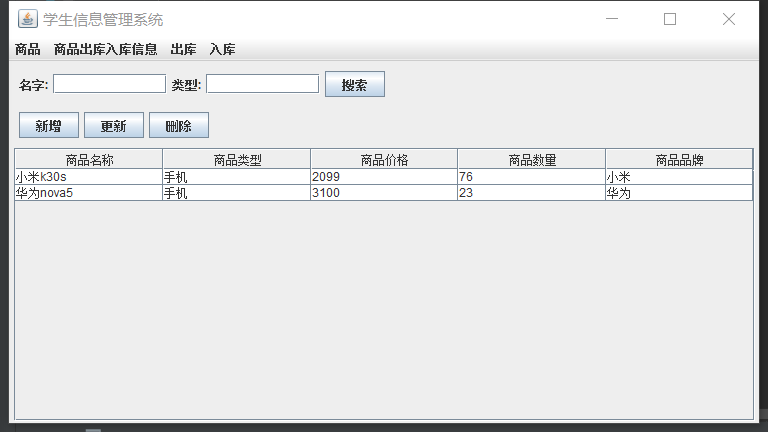
1、商品界面
-
将新增、更新、删除添加到面板,顺序放到 table 表上面
-
按顺序排列在 MyTableByGoods()上面、查询->增删改->表格
-
按钮左对齐:
this.setLayout(new FlowLayout(FlowLayout.LEFT));
query = new JPanel(new FlowLayout(FlowLayout.LEFT));
option = new JPanel(new FlowLayout(FlowLayout.LEFT));
8 月 9 日午 10 点 20 左右
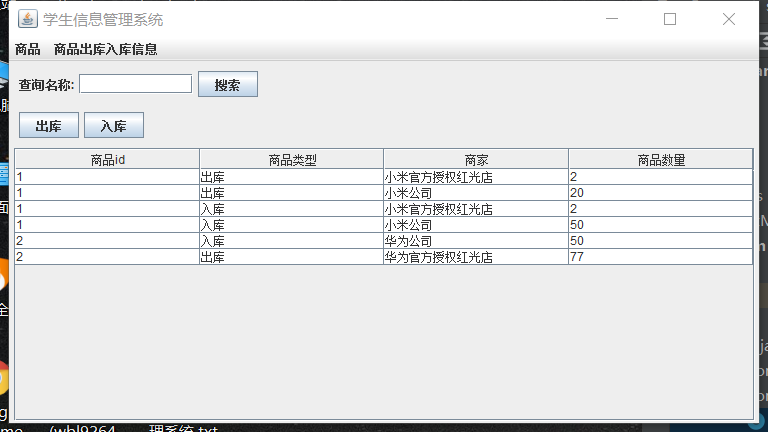
1、商品出库入库信息界面
2、商品更新功能
- update.setEnabled(false); //使按扭失去单击效果
- 在 GoodsDao 类中
//更新
public boolean update(Goods goods)
{
    boolean flag = false;
    con = getCon();
    try {
        pst = con.prepareStatement("update goods set  category=?,price=?,sum=?,brand=? where name=?");
        pst.setString(1, goods.getCategory());
        pst.setDouble(2, goods.getPrice());
        pst.setInt(3,goods.getSum());
        pst.setString(4,goods.getBrand());
//where xx=?要放在最后 ,问号在第几个位置和 pst 语句的 12345 要对应
        pst.setString(5, goods.getName());
        pst.executeUpdate();
        flag = true;
    } catch (SQLException e) {
        e.printStackTrace();
    }
    return flag;
}
3、登录界面
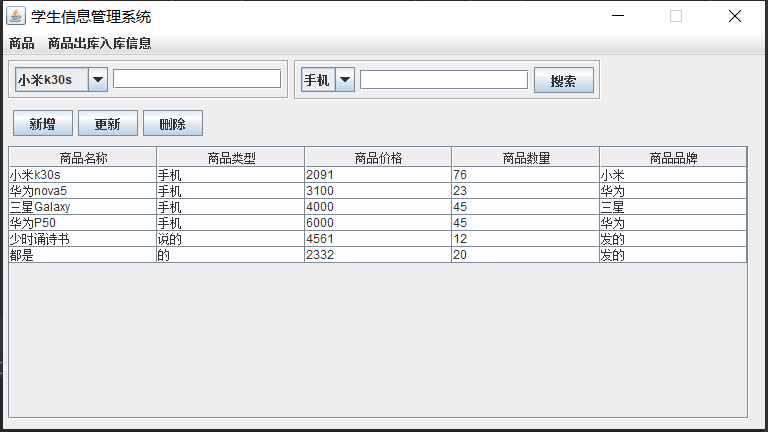
4、JComboBox 如何动态绑定数据库??、?
Mytable 类中:
//下拉框名称
con = getCon();
try {
    pst = con.prepareStatement("select * from goods ");
    rs = pst.executeQuery();
    Vector v = new Vector();
    while (rs.next()) {
        String list = rs.getString("name");
        v.add(list);
    }
    query = new JPanel();
    combName = new JComboBox<String>();
    name = new JTextField(15);
    add(query, BorderLayout.PAGE_START);
    //设置边框
    query.setBorder(BorderFactory.createEtchedBorder());
    combName.setModel(new DefaultComboBoxModel<String>(v));
    //制作监听器
    ActionListener m = new ActionListener() {
        @Override
        public void actionPerformed(ActionEvent e) {
            // TODO Auto-generated method stub
            String item = (String) combName.getSelectedItem(); //获取项目名(选择的省份)
            if ("请选择商品:".equals(item))
                name.setText("");
            else
                name.setText(item);
        }
    };
    //添加监听器
    combName.addActionListener(m);
    query.add(combName);
    query.add(name);
} catch (SQLException e) {
    e.printStackTrace();
}
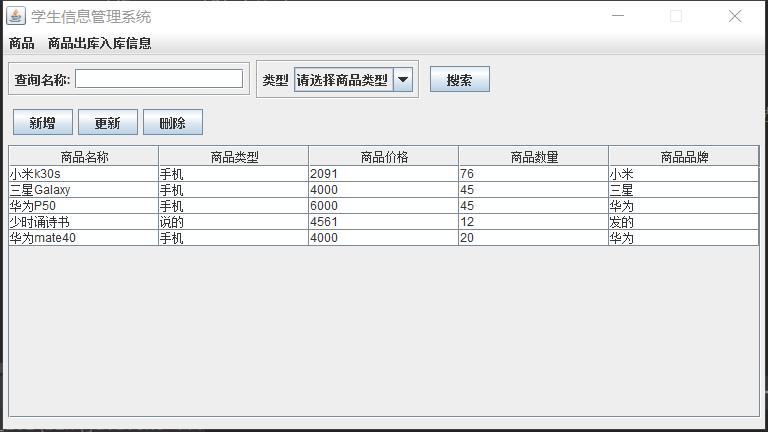
5、如何在数据表上搜索过滤数据??
public MyTableByGoods() throws SQLException, ClassNotFoundException {
//下拉框类型
        Vector v = new Vector();
        v.add("请选择商品类型");
        v.add("手机");
        v.add("电脑");
        v.add("相机");
        query = new JPanel();
        inputCategory = new JLabel("类型");
        query.add(inputCategory);
        comboCategory = new JComboBox<String>();
        add(query, BorderLayout.PAGE_START);
        //设置边框
        query.setBorder(BorderFactory.createEtchedBorder());
        comboCategory.setModel(new DefaultComboBoxModel<String>(v));
        //制作监听器
        ActionListener m = new ActionListener() {
            @Override
            public void actionPerformed(ActionEvent e) {
                String item = (String) comboCategory.getSelectedItem();
                if ("请选择商品类型".equals(item)) {
                    categoryQuery = "";
                } else {
                    categoryQuery = item;
                }
            }
        };
        //添加监听器
        comboCategory.addActionListener(m);
        query.add(comboCategory);
        query = new JPanel();
        search = new JButton("搜索");
        query.add(search);
        search.addActionListener(this);
}
@Override
public void actionPerformed(ActionEvent e) {
    JButton b = (JButton) e.getSource();
    if (b == search) {
            GoodsDao goodsDao = new GoodsDao();
            goodsDao.searchData(dtm, name.getText(), categoryQuery);
        }
}
///////////////////////////////////////////////////////
GoodsDao 类中:
public class GoodsDao {
    public void searchData(DefaultTableModel dtm, String name, String category) {
        String[][] comm = getGoodsList(name, category);
        int index = dtm.getRowCount();
        while (index != 1) {
            try {
                dtm.removeRow(0);
                index = dtm.getRowCount();
            } catch (RuntimeException e) {
                e.printStackTrace();
            }
        }
        for (int i = 0; i < comm.length; i++) {
            dtm.addRow(comm[i]);
        }
        dtm.removeRow(0);
        dtm.fireTableDataChanged();
    }
//获取数据表的数据、搜索功能
    public String[][] getGoodsList(String name, String category) {
        con = getCon();
        try {
            if (name.trim().equals("") && category.trim().equals("")) {
                pst = con.prepareStatement("select * from goods");
            } else if (!name.trim().equals("") && category.trim().equals("")) {
                pst = con.prepareStatement("select * from goods where name like ?");
                pst.setString(1, "%" + name.trim() + "%");
            } else if (name.trim().equals("") && !category.trim().equals("")) {
                pst = con.prepareStatement("select * from goods where category = ?");
                pst.setString(1, category);
            } else {
                pst = con.prepareStatement("select * from goods where name like ? and category = ?");
                pst.setString(1, "%" + name.trim() + "%");
                pst.setString(2, category);
            }
            rs = pst.executeQuery();
            rs.last();
            int row = rs.getRow();//获取记录的总条数
            rs.beforeFirst();//游标回到第一个记录前的位置
            String comm[][] = new String[row][5];//row 行、5 列
            rs.next();//游标回到第一个记录的位置
            for (int i = 0; i < row; i++) {
                comm[i][0] = rs.getString("name");
                comm[i][1] = rs.getString("category");
                comm[i][2] = rs.getString("price");
                comm[i][3] = rs.getString("sum");
                comm[i][4] = rs.getString("brand");
                rs.next();
            }
            rs.close();
            return comm;
        } catch (SQLException e) {
            e.printStackTrace();
            try {
                pst.close();
                con.close();
            } catch (SQLException throwables) {
                throwables.printStackTrace();
            }
        }
        return null;
    }
6、添加一条出入库信息、和商品 sum 如何同步
//添加出入库信息
public boolean addIn (OutIn outIn, Component parentComponent)
{
    boolean flag = false;
    con = GetCon.getCon();
    try {
        PreparedStatement selectSum = con.prepareStatement("select sum from goods where id = ?");
        selectSum.setString(1, outIn.getGoods_id());
        rs = selectSum.executeQuery();
        rs.next();//游标回到第一个记录的位置
        int sum = rs.getInt(1);
        selectSum.close();
        if (sum < outIn.getSum()&&outIn.getType().equals("出库")){
            JOptionPane.showMessageDialog(parentComponent, "该商品出库数量大于库存数量,请重新输入商品出库数量!!!");
            return false;
        }
        pst = con.prepareStatement("insert into out_in values(null,?,?,?,?)");
        pst.setString(1, outIn.getGoods_id());
        pst.setString(2, outIn.getType());
        pst.setString(3, outIn.getMerchant());
        pst.setInt(4, outIn.getSum());
        pst.execute();
        PreparedStatement pstUpdate = con.prepareStatement("update goods set sum = ? where id = ?");
        if (outIn.getType().equals("入库")){
            pstUpdate.setInt(1,sum+outIn.getSum());
        }else {
            pstUpdate.setInt(1,sum-outIn.getSum());
        }
        pstUpdate.setInt(2,Integer.parseInt(outIn.getGoods_id()));
        pstUpdate.execute();
        pstUpdate.close();
        flag = true;
        rs.close();
        pst.close();
        con.close();
    } catch (SQLException e) {
        e.printStackTrace();
    }
    return flag;
}
7、窗口不可调节大小
this.setResizable(false);
8、未输入时弹出对话框,提示请输入
public Goods getGood() {
        Goods goods = new Goods();
        if (goodsName.getText().equals("")){
            JOptionPane.showMessageDialog(this, "请输入商品名称");
            return null;
        }else if(comboCategory.getSelectedItem().equals("请选择商品类型")){
            JOptionPane.showMessageDialog(this, "请选择商品类型");
            return null;
        }else if (goodsPrice.getText().trim().equals("")){
            JOptionPane.showMessageDialog(this, "请输入商品价格");
            return null;
        }else if (goodsBrand.getText().trim().equals("")){
            JOptionPane.showMessageDialog(this, "请输入商品品牌");
            return null;
        }
        goods.setName(goodsName.getText());
        goods.setCategory((String) comboCategory.getSelectedItem());
        goods.setPrice(Double.parseDouble(goodsPrice.getText()));
        goods.setBrand(goodsBrand.getText());
        return goods;
    }


