问题
解决办法
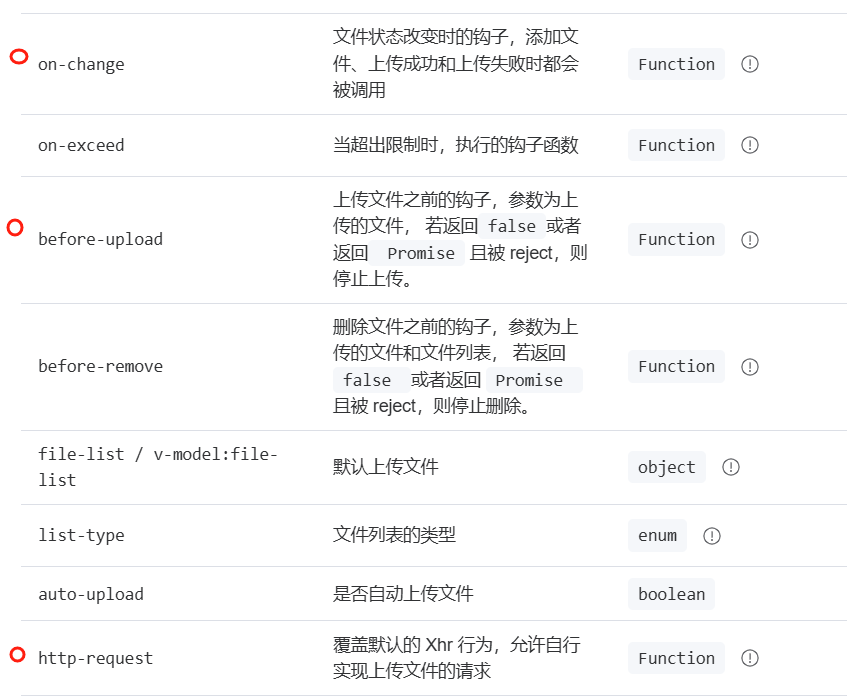
- ①使用在 http-request 的 function 内,用 formData 方式上传,可以解决跨域问题。
- ②或者 可以在 before-upload 方法内用 formData 方式上传 之后 return 。
- 在此我是在on-change获取 file,然后调用上传方法。
![]()
代码
<template>
  <el-upload :file-list="value"
             action="#"
             drag
             ref="fileUpload"
             :limit="maxSize"
             with-credentials
             :multiple="multiple"
             :auto-upload="false"
             :show-file-list="showFileList"
             :on-change="handleChange"
  >
    <el-icon class="el-icon--upload">
      <upload-filled/>
    </el-icon>
    <div class="el-upload__text">
      <em>点击上传</em>或者将文件拖拽到虚线框内上传文件
    </div>
  </el-upload>
</template>

<script setup>
import {ElMessage, ElMessageBox, ElNotification} from "element-plus";
import {getToken} from '@/utils/auth'
import {getUploadUrl, uploadSingle} from "@/api/home";

const headers = reactive({
  authorization: getToken(), //token
  'Access-Control-Allow-Origin': "*",
  'access-control-allow-headers': 'token, Origin, X-Requested-With, Content-Type, Accept, Authorization',
  'access-control-allow-methods': ' POST,GET,PUT,DELETE,HEAD,OPTIONS,PATCH',
  'access-control-allow-origin': '*',
  'Access-Control-Origin': 'https://xxx.xx.com'
})

const fileUpload = ref()
const fileList = ref([])
const props = defineProps({
  value: {
    type: Array,
    default: () => {
      return []
    }
  },
  maxSize: {
    type: Number,
    default: 1
  },
  showFileList: {
    type: Boolean,
    default: false
  },
  multiple: {
    type: Boolean,
    default: false
  }
})
const handleChange = (file, fileList) => {
  singleUpload(fileList)
}
const singleUpload = (fileList) => {
  //如果文件小于 1M, 直接上传
  let fd = new FormData();
  fileList.forEach(item => {
    fd.append("file", item.raw);
  })
  fd.append("uid", localStorage.getItem('uid'));
  uploadSingle(fd).then(res => {
    if (res.code === 200) {
      handleUploadSuccess(res)
    } else {
      ElMessage.error(res.msg)
    }
  }).catch(error => {
    nextTick(() => {
      fileUpload.value.clearFiles();
    })
    ElMessage.error('上传文件失败:该文件类型不允许上传')
  });
}
const handleUploadSuccess = (res) => {
  ElNotification({
    title: '提示',
    message: res.msg,
    type: 'success'
  })
  emit("getFile", res.data)
}
</script>


