看 uview-plus 官方文档 中 Radio 单选框 组件不能用<template #label>来自定义 label, 加个头像啥的等
想要效果
- 在单元格组件 u-cell 前面想加个单选框
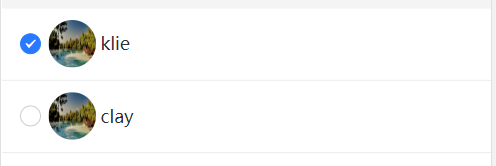
解决办法
结果还是嵌套 uview-plus 的组件实现的
完整代码
    <u-cell-group :border="false">
        <u-radio-group v-model="radiovalue" placement="column">
            <u-cell v-for="(item,index) in memberList" :key="index" :title="item.userName">
                <template #icon>
                    <u-radio shape="circle" @change="radioChange($event,item)" :name="item.id"></u-radio>
                    <up-avatar :src="item.avatar"></up-avatar>
                </template>
            </u-cell>
        </u-radio-group>
    </u-cell-group>

<script setup>
        const memberList = ref([{
            id: 1,
            checked: false,
            userName: 'klie',
            avatar: 'https://cdn.uviewui.com/uview/album/3.jpg'
        },
        {
            id: 2,
            checked: false,
            userName: 'clay',
            avatar: 'https://cdn.uviewui.com/uview/album/3.jpg'
        }
    ])
    const radiovalue = ref(1);
    const radioChange = (n, item) => {
    //n 即为 u-radio 标签设置的 name 属性
        console.log('radioChange', n, item);
    };
    </script>


