TinyMCE 简介
- TinyMCE 是一款易用、且功能强大的所见即所得的富文本编辑器
- 刚开始使用官网的写法, 发现安装插件都是放在云端的, 初始化加载太慢, 我就选择了本地部署, 然后解决了这个 tinymce 初始化加载太慢的问题, 从而在 vue3 项目中集成 tinymce 富文本编辑器
演示效果
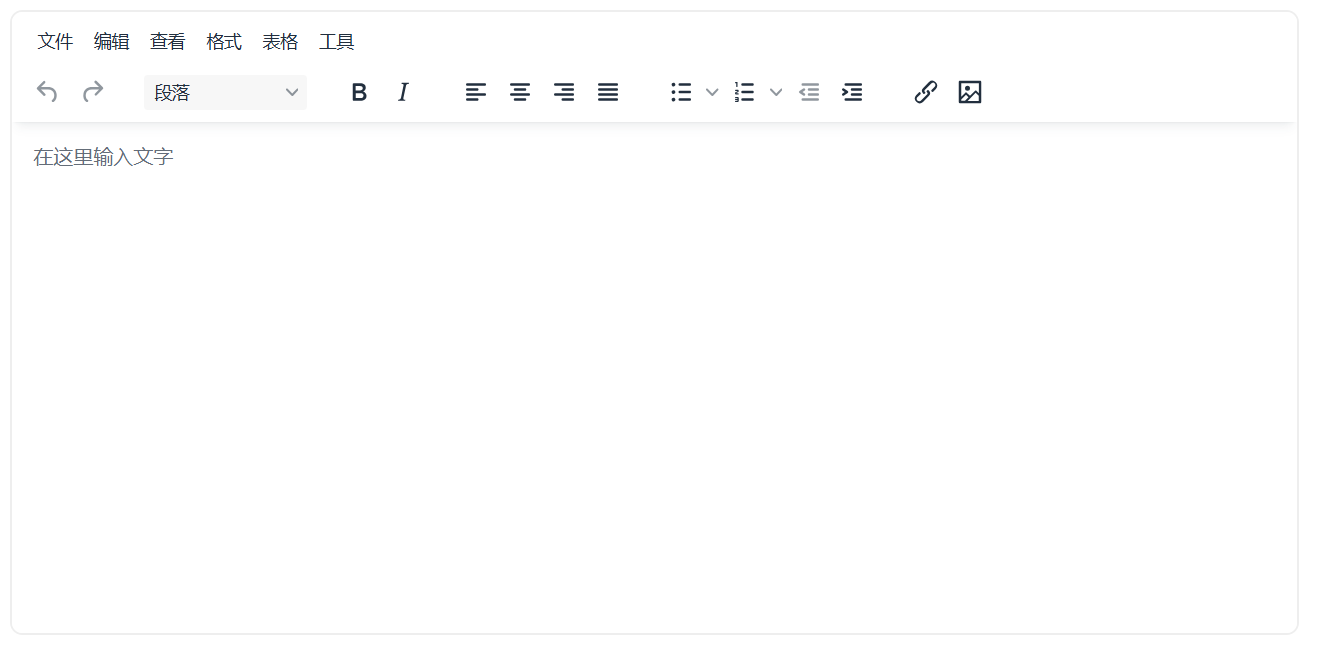
版本说明
- "vue": "^3.2.47",
- "@tinymce/tinymce-vue": "^4.0.7", 支持 vue3.0 版本, 但不支持 2.0 版本
- "tinymce": "^5.0.4",
安装
命令行操作
npm install --save "@tinymce/tinymce-vue@^4"
npm install --save "tinymce"
创建组件 Tinymce.vue
- 在 src/components 目录创建组件 Tinymce.vue
注意
-
编辑器本身是英文编辑器,所以还需要下载本地化文件(下载这个)
语言包 |可信富文本编辑器 |TinyMCE -
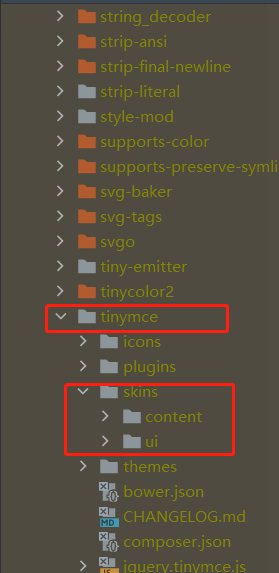
/langs/zh_CN.js : 这是汉化路径, 将下载的 zh_CN.js 放于项目根目录 public/langs/里面
 skin_url: '/skins/ui/oxide', //皮肤
content_css: '/skins/content/default/content.css',- 将/node_modules/tinymce 里面的 skins 样式文件复制到 public 里面, 用于赋值 skin_url 和 content_css
附件上传
附件上传位置
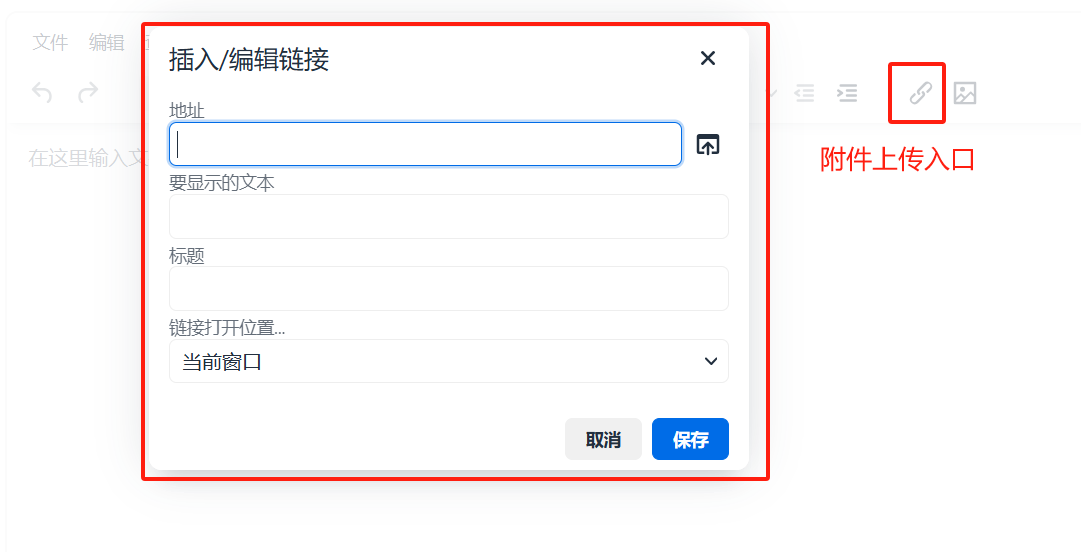
附件上传函数
 file_picker_callback: (callback, value, meta) => {
    // 使用案例 http://tinymce.ax-z.cn/general/upload-images.php
    // meta.filetype  //根据这个判断点击的是什么 file image media
    let filetype; //限制文件的上传类型,需要什么就添加什么的后缀
    if (meta.filetype == "image") {
      filetype = ".jpg, .jpeg, .png, .gif, .ico, .svg";
    } else if (meta.filetype == "media") {
      filetype = ".mp3, .mp4, .avi, .mov";
    } else {
      filetype =
          ".pdf, .txt, .zip, .rar, .7z, .doc, .docx, .xls, .xlsx, .ppt, .pptx, .mp3, .mp4, .jpg, .jpeg, .png, .gif, .ico, .svg";
    }
    let inputElem = document.createElement("input"); //创建文件选择
    inputElem.setAttribute("type", "file");
    inputElem.setAttribute("accept", filetype);
    inputElem.click();
    inputElem.onchange = () => {
      let file = inputElem.files[0]; //获取文件信息
      let xhr, formData;
      xhr = new XMLHttpRequest();
      xhr.withCredentials = false;
      xhr.open('POST', url);//url 是后端附件上传接口
      xhr.setRequestHeader(
        'Authorization',getToken()
      )//设置头部 token
      let loading= ElLoading.service({
        lock: true,
        text: '文件上传中...',
        background: 'rgba(0, 0, 0, 0.7)',
      })
      xhr.onload = function() {
        let res;
        res = JSON.parse(xhr.responseText);
          ElNotification({
            title: '提示',
            message: res.code === 1000 ? '上传成功' : '上传失败',
            type: res.code === 1000 ? 'success' : 'error'
          })
        loading.close()
        const fileUrl = res.data.url;
        callback(fileUrl+'?fileName='+res.data.originalFilename, {text:file.name ,title: file.name });
      };
      formData = new FormData();
      formData.append('file', file, file.name );
      xhr.send(formData);
    };
  },
注:
- 附件上传回调,第一个参数是文件地址 ( 携带 fileName 参数, 用于文件下载时显示原文件名 );第二个参数是 Object, 分别是 text ( 设置显示的文本信息 ),和 title ( 标题 )
callback(fileUrl+'?fileName='+res.data.originalFilename, {text:file.name ,title: file.name });附件上传成功后显示效果
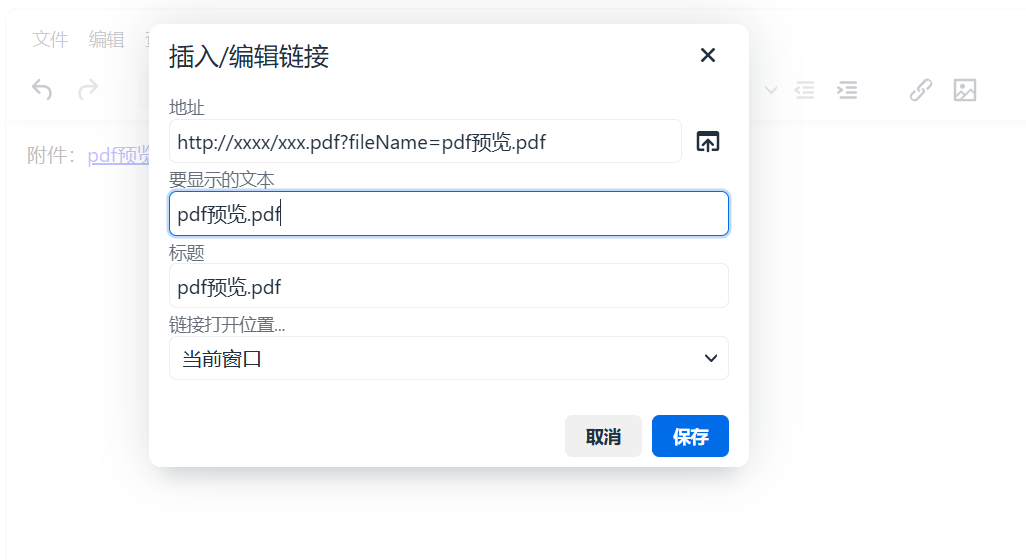
附件下载
- 点击文件名方可下载
富文本编辑器的内容详情展示

<div class="article-a" v-html="formData.articleContent" @click="clickHandle"></div>- 为 div 设置 class="article-a" 属性, 可以为刚刚上传的附件名设置颜色
.article-a {
  a {
    color: #409eff !important;
    &:hover {
      text-decoration: underline !important;
    }
  }
}- 为 div 设置 @click="clickHandle" , 绑定点击事件 ( 原文件名下载 )
const clickHandle = (e) => {
  if (e.target.nodeName == "A") {
    e.preventDefault()
    let url = e.target.href.split('?')[0];
    const searchParams = new URLSearchParams(e.target.href.split('?')[1])
    const fileId = searchParams.get('fileId');
    const fileName = searchParams.get('fileName');
    let item = {
      url,
      fileName
    }
    download(item)
  }
}
const download = (row) => {
const x = new window.XMLHttpRequest();
x.open('GET', row.url, true);
x.responseType = 'blob';
x.onload = () => {
const url = window.URL.createObjectURL(x.response);
const a = document.createElement('a');
a.href = url;
a.download = row.fileName;
a.click();
};
x.send();
}完整代码
<template>
  <div class="tinymce-boxz">
    <Editor v-model="content" :init="init"/>
  </div>
</template>

<script setup>
import tinymce from 'tinymce'
import Editor from "@tinymce/tinymce-vue";
import {defineProps} from "vue";
import {ElMessage} from "element-plus";
import {getToken} from '@/utils/auth'
import axios from "axios";

import 'tinymce/themes/silver'
import 'tinymce/icons/default/icons'
import 'tinymce/plugins/preview'
import 'tinymce/plugins/searchreplace'
import 'tinymce/plugins/autolink'
import 'tinymce/plugins/directionality'
import 'tinymce/plugins/visualblocks'
import 'tinymce/plugins/visualchars'
import 'tinymce/plugins/advlist'
import 'tinymce/plugins/fullscreen'
import 'tinymce/plugins/image'
import 'tinymce/plugins/link'
import 'tinymce/plugins/media'
import 'tinymce/plugins/template'
import 'tinymce/plugins/code'
import 'tinymce/plugins/codesample'
import 'tinymce/plugins/table'
import 'tinymce/plugins/pagebreak'
import 'tinymce/plugins/nonbreaking'
import 'tinymce/plugins/anchor'
import 'tinymce/plugins/insertdatetime'
import 'tinymce/plugins/lists'
import 'tinymce/plugins/wordcount'
import 'tinymce/plugins/autosave'

const emit = defineEmits(['update:value'])
const props = defineProps({
  //默认值
  value: {
    type: String,
    default: "",
  },
  imageUrl: {
    type: String,
    default: "",
  },
  fileUrl: {
    type: String,
    default: "",
  },
  plugins: {
    type: [String, Array],
    default:
        "preview searchreplace autolink directionality visualblocks visualchars fullscreen image link media template code codesample table pagebreak nonbreaking anchor insertdatetime advlist lists wordcount autosave",
  },
  toolbar: {
    type: [String, Array],
    default: [
      "fullscreen undo redo restoredraft | cut copy paste pastetext | forecolor backcolor bold italic underline strikethrough link anchor | alignleft aligncenter alignright alignjustify outdent indent | bullist numlist | blockquote subscript superscript removeformat ",
      "styleselect formatselect fontselect fontsizeselect |  table image axupimgs media  pagebreak insertdatetime  selectall visualblocks searchreplace | code preview | indent2em lineheight formatpainter",
    ],
  },
  fontFormats: {
    type: [String, Array],
    default: "微软雅黑=Microsoft YaHei,Helvetica Neue,PingFang SC,sans-serif;苹果苹方=PingFang SC,Microsoft YaHei,sans-serif;宋体=simsun,serif;仿宋体=FangSong,serif;黑体=SimHei,sans-serif;Arial=arial,helvetica,sans-serif;Arial Black=arial black,avant garde;Book Antiqua=book antiqua,palatino;"
  }
})
const content = ref(props.value);
const imgUrl = ref();
const init = reactive({
  language_url: '/langs/zh_CN.js', //汉化路径是自定义的
  skin_url: '/skins/ui/oxide', //皮肤
  content_css: '/skins/content/default/content.css',
  language: 'zh_CN',
  placeholder: "在这里输入文字", //textarea 中的提示信息
  min_width: 320,
  min_height: 220,
  height: 500, //注:引入 autoresize 插件时,此属性失效
  resize: "both", //编辑器宽高是否可变,false-否,true-高可变,'both'-宽高均可,注意引号
  promotion: false,
  branding: false, //tiny 技术支持信息是否显示
  statusbar: false,  //最下方的元素路径和字数统计那一栏是否显示
  elementpath: false, //元素路径是否显示
  font_formats: props.fontFormats,  //字体样式
  plugins: props.plugins, //插件配置 axupimgs indent2em
  toolbar: props.toolbar, //工具栏配置,设为 false 则隐藏
  menubar: "file edit view format table tools", //菜单栏配置,设为 false 则隐藏,不配置则默认显示全部菜单,也可自定义配置--查看 http://tinymce.ax-z.cn/configure/editor-appearance.php --搜索“自定义菜单”
  // images_upload_url: '/apib/api-upload/uploadimg',  //后端处理程序的 url,建议直接自定义上传函数 image_upload_handler,这个就可以不用了
  // images_upload_base_path: '/demo',  //相对基本路径--关于图片上传建议查看--http://tinymce.ax-z.cn/general/upload-images.php
  paste_data_images: true, //图片是否可粘贴
  file_picker_types: "file image media", //file image media 分别对应三个类型文件的上传:link 插件,image 和 axupimgs 插件,media 插件。想屏蔽某个插件的上传就去掉对应的参数
  // 文件上传处理函数
  setup: function (editor) {
    editor.on('change', function (e) {
      tinymce.activeEditor.save();//执行自动保存
    });
  },
  //此处为图片上传处理函数
  images_upload_handler: (blobInfo, success) => {
    let formData = new FormData()
    formData.append('file', blobInfo.blob())
    //上传图片接口 上传成功后返回图片地址,用于显示在富文本中
    uploadFile(formData, props.imageUrl, success)
  },
  file_picker_callback: (callback, value, meta) => {
    // 使用案例 http://tinymce.ax-z.cn/general/upload-images.php
    // meta.filetype  //根据这个判断点击的是什么 file image media
    let filetype; //限制文件的上传类型,需要什么就添加什么的后缀
    if (meta.filetype == "image") {
      filetype = ".jpg, .jpeg, .png, .gif, .ico, .svg";
    } else if (meta.filetype == "media") {
      filetype = ".mp3, .mp4, .avi, .mov";
    } else {
      filetype =
          ".pdf, .txt, .zip, .rar, .7z, .doc, .docx, .xls, .xlsx, .ppt, .pptx, .mp3, .mp4, .jpg, .jpeg, .png, .gif, .ico, .svg";
    }
    let inputElem = document.createElement("input"); //创建文件选择
    inputElem.setAttribute("type", "file");
    inputElem.setAttribute("accept", filetype);
    inputElem.click();
    inputElem.onchange = () => {
      let file = inputElem.files[0]; //获取文件信息
      let reader = new FileReader();
      reader.readAsDataURL(file);
      reader.onload = function () {
        let id = "blobid" + new Date().getTime();
        let blobCache = tinymce.activeEditor.editorUpload.blobCache;
        let base64 = reader.result.split(",")[1];
        let blobInfo = blobCache.create(id, file, base64);
        blobCache.add(blobInfo);
        callback(blobInfo.blobUri(), {alt: file.name});
      };
    };
  },
});
//内容有变化,就更新内容,将值返回给父组件
watch(() => {
  emit("update:value", content.value);
});
//图片上传函数
const uploadFile = (formData, url,success) => {
  axios.post(
      'http://192.168.xx.xx:xxxx' + url,//上传接口 完整 url
      formData,
      {
        headers: {
          'Content-Type': 'multipart/form-data',
          Authorization: getToken()
        }
      }
  ).then(res => {
    // if (res.status !== 200) {
    //   ElMessage.error("上传失败!")
    // }
    let data = res.data
    if (data.code !== 1000) {
      ElMessage.error(data.msg)
    }else {
      success(data.data.url)
    }
  })
}
</script>
<style scoped>
.tinymce-boxz > textarea {
  display: none;
}
</style>
<style>
/* 隐藏 apikey 没有绑定当前域名的提示 */
.tox-notifications-container .tox-notification--warning {
  display: none !important;
}

.tox.tox-tinymce {
  max-width: 100%;
}
</style>
页面上引用
- /notice/file 上传文件接口
<Tinymce image-url="/notice/file" file-url="/notice/file" v-model:value="form.noticeContent"/>


